Workshop overview
The unified workshop hub — a cross-product queue across repairs and bespoke, a KPI strip that surfaces what's active, what's overdue, what's ready for pickup, and the held-7-days filter that flags pieces sitting on the ready shelf too long.
Quick reference
- The workshop hub lives at /workshop. One page for everything happening at the bench, regardless of whether it's a repair or a bespoke commission.
- Five KPIs across the top: Active jobs, Overdue, Due this week, Ready for pickup and Bespoke in production. Each tile clicks through to a pre-filtered view.
- The unified queue at /workshop/board merges repairs and bespoke jobs into one list with status pills (Active, Overdue, Ready for pickup, Completed) and a type filter (Repair / Bespoke).
- The Held > 7 days sub-filter on the Ready tab surfaces pieces that have been sitting on the ready shelf more than a week — the “why hasn't this been picked up?” queue.
- /workshop/calendar renders every due-dated repair and bespoke job on a month calendar so you can see what's landing this week without scrolling a list.
- Recent activity panel at the bottom of the hub: last six stage changes across repairs and bespoke, with the customer name and time-ago — a passive feed of what the team's been doing.
What lives where
1. The hub at /workshop
The hub is the front door. Three blocks, top to bottom: the status pill row (All Jobs, Active, Overdue, Ready for Pickup, Completed), the KPI strip, and the recent-activity feed. The board itself is its own page now — Workshop → Workshop Board in the top navigation, at /workshop/board. Repairs, bespoke jobs and passports each have their own navigation entry too, so the hub no longer duplicates them as tiles.
The status pills carry a badge on Overdue showing the live count — at a glance, you know whether anything has slipped past its due date without drilling into the queue.
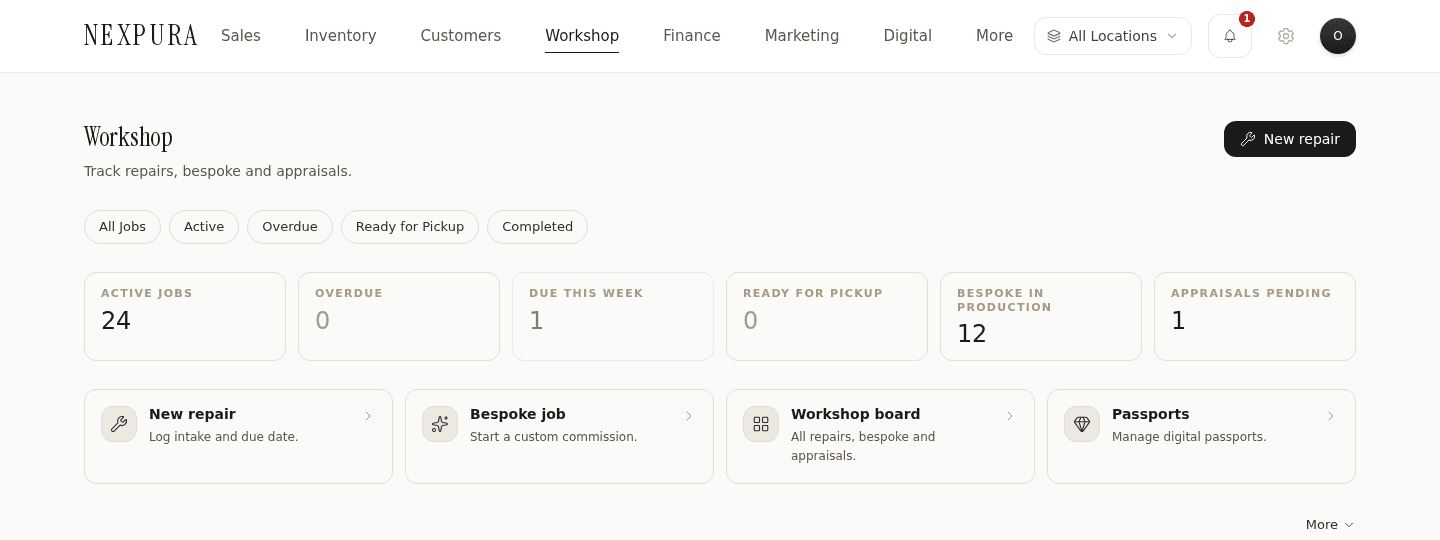
2. The KPI strip
Five tiles, in this order, each clickable:
- Active jobs — every repair and bespoke row not in a terminal stage (collected / completed / cancelled) and not yet at ready. The day-to-day workload number.
- Overdue — active jobs where due_date is before today. The pill tint goes oxblood when the count is non-zero so you can't miss it.
- Due this week — active jobs with due_date between today and seven days out. The shape of the coming week.
- Ready for pickup — repairs and bespoke at the ready stage. The pieces sitting on the ready shelf waiting for the customer.
- Bespoke in production — active bespoke jobs specifically, so the owner can see custom-work load distinct from the repair pipeline.
Counts cache for five minutes — accurate enough for the hub, cheap on the database. Drill into any tile and the underlying view is real-time.
3. The unified queue at /workshop/board
One list, two job sources merged. Each row tells you the type (Repair / Bespoke), a short identifier, the customer, the current stage, the due date, and the value. Sort by due date (default), filter by status pill, narrow by type.
The board respects per-user permissions. If a staff member has view_repairs but not view_bespoke, the bespoke rows just don't appear — same surface, less data, no “you can't see this” clutter.
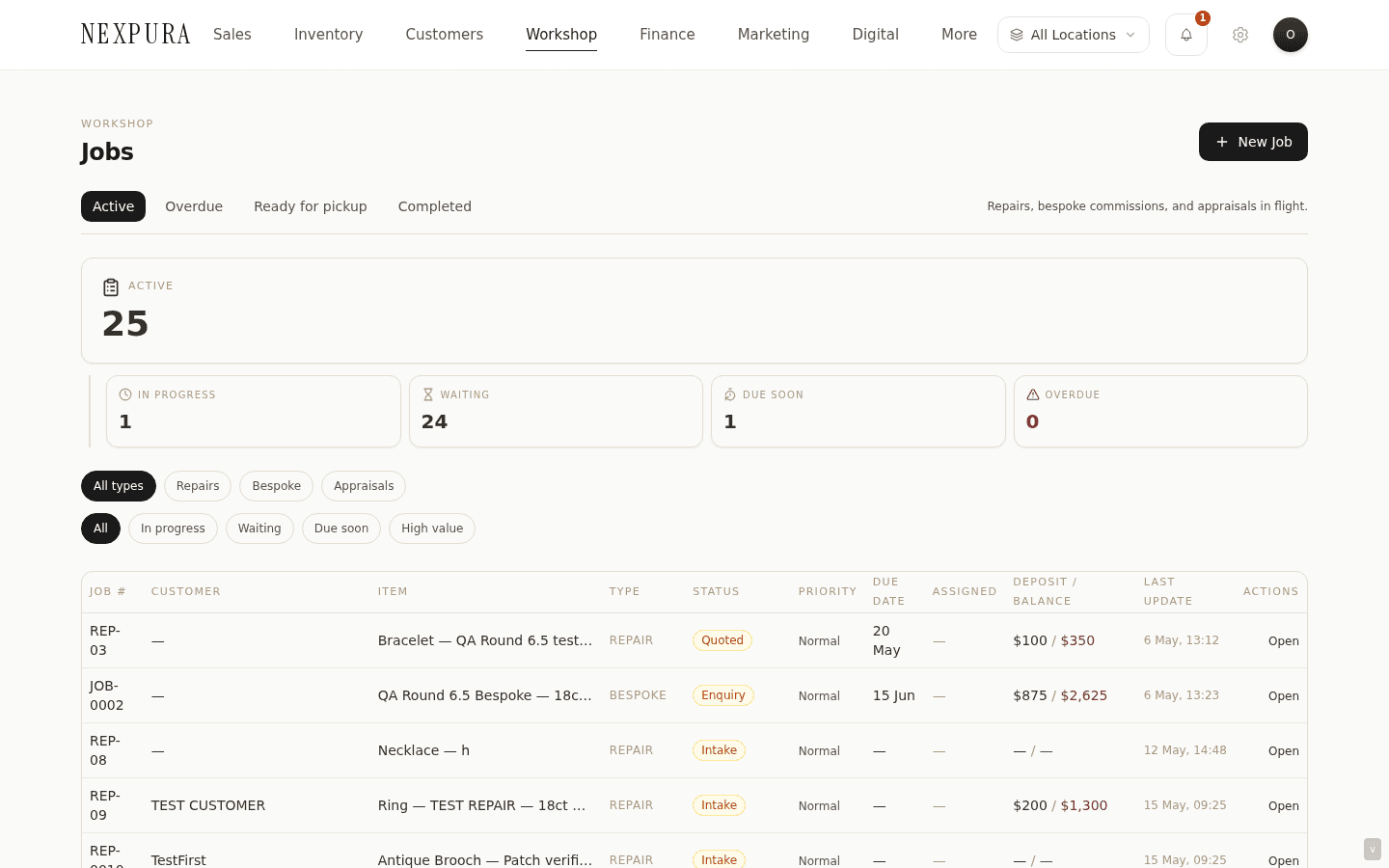
4. The held-7-days filter
On the Ready for Pickup status pill, an extra sub-filter chip surfaces: Held > 7 days. That pulls the ready-pile rows whose last stage change was more than a week ago — the pieces a customer hasn't come back for.
Use it as the lever for the pickup-chase workflow: pull the list once a week, work down it with calls or messages, and watch the count drop. The held-7-days view is the queue you act on to keep the ready shelf from silting up.
5. The calendar view at /workshop/calendar
A month calendar with every due-dated repair and bespoke job plotted on its due date. Each event tile shows the ticket/job number and a short label; click through to the detail page.
If your tenant has Google Calendar connected via /settings/integrations, the workshop events also sync into the connected Google Calendar — bench staff can see the workshop schedule alongside their personal calendar without flipping tabs.
Screenshot pending
Workshop calendar — month view with five repair-due tiles on different days, the active day outlined, and a 'Connected to Google Calendar' chip in the top-right.
6. Recent activity feed
The bottom of the hub renders the six most recently-updated repair and bespoke rows in one merged feed — the customer name, the current stage badge, and a relative timestamp (“3h ago”, “yesterday”). Click any row to jump into the job.
It's a passive surface — not a notification feed, not an event log. It's the “what's the team been doing lately” glance, useful when you walk in mid-morning and want a sense of yesterday's pace without opening four tabs.
Common questions
Why is there a separate hub if I can already see repairs and bespoke under their own pages?
/repairs and /bespoke are the per-product surfaces — deep, filterable, with full kanban boards for each pipeline. The workshop hub is the cross-product one: the answer to “what does the bench look like right now, across everything”. When you're running a busy day with three repairs hot and a bespoke deposit just landed, the hub is the single screen that holds all of that.
Why doesn't the “Active jobs” count include pieces at the ready stage?
Active is “work the bench still has on its plate”. Once a piece hits ready, the bench is done; the next motion lives at the front-of-counter (call the customer, hand it over, mark collected). So ready gets its own KPI tile — the pickup-shelf number — separate from active. That way the active number tracks bench workload, not shelf-warming inventory, and the ready number tracks the pickup queue without competing with it.
How fresh are the KPI counts?
The hub caches counts for five minutes at the tenant level. If you just completed a repair and the Ready for pickup tile doesn't tick up, wait a minute or refresh the page — the cache will turn over within the five-minute window. Drill into /workshop/board?status=ready-for-pickup for a real-time list.
What counts as “overdue”?
Any active repair or bespoke job (i.e. not collected, not completed, not cancelled, not yet at ready) whose due_date has passed today. Overdue compares against your tenant's timezone, so a Sydney store doesn't see a row flag as overdue while it's still “today” locally. Pieces at ready don't count as overdue — they're done from the workshop's side, even if the customer hasn't come back yet (that's what held-7-days is for).
Can I filter the queue to just my assigned work?
Not yet by individual assignment — repairs and bespoke jobs don't have an assigned_to column wired through to the unified queue today. Status, type, and due-date filters apply across the queue, and the location switcher in the top nav restricts what you see to a specific store if you have multiple. Per-user assignment lives on the individual repair and bespoke pages, just not on the merged board.
Why does the held-7-days filter use the last update instead of when the piece moved to ready?
Repairs and bespoke jobs don't record a dedicated ready_at timestamp. The filter uses each row's last-updated timestamp as a proxy — once a piece is at ready, the most common reason for a subsequent update is the pickup itself, so “last updated more than 7 days ago” lines up with “sat on the ready shelf for more than a week” in practice. If staff routinely edit notes on ready rows, the filter will under-count slightly — we'll flip to a real ready_at timestamp the next time the stage-history schema gets touched.
Troubleshooting
The KPI tile counts don't match what I see in the detail list
Symptom:the hub's Active jobs tile shows 12 but the merged queue at /workshop/board?status=active shows 13. Cause: the hub counts cache for five minutes; if a job was just created, completed, or stage-moved in the last few minutes the tile will lag the live list. Fix:refresh the hub after the five-minute window expires, or treat the merged queue list as the source of truth for any individual job's state. The hub is for the glance, the queue is for the work.
A bespoke or repair row I can normally see is missing from the queue
Symptom:a job you know exists isn't in /workshop/board even with all filters off. Cause: almost always a permissions or location-scope filter. The merged queue respects per-user permissions (view_repairs / view_bespoke) and the active location filter from the top nav. Fix: open the top-nav location switcher and flip to All locations — if the row reappears, it lives at a different location than the one you had selected. If it still doesn't, an owner can check your role at /settings/team and confirm you have the relevant view permission.
Calendar view shows no events even though I have due-dated jobs
Symptom: the workshop calendar at /workshop/calendar renders an empty month. Cause: the calendar reads repairs and bespoke rows with a non-null due_date only. Rows where due-date was never set don't appear (and a piece without a due-date can't be plotted on a date axis). Fix: open the missing job from /workshop/board and set a due-date — the calendar will pick it up on the next page load.
Recent activity feed feels stale
Symptom:a stage change you just made doesn't appear in the recent-activity panel. Cause: the activity feed caches for sixty seconds and shows the most recent six rows; if six other updates happened after yours, your change has rolled off the visible window. Fix: click into the specific repair or bespoke job from the queue — the per-job stage history is real-time and shows every transition with timestamps. The hub activity feed is a glance, not the audit log.
Related
- Repair pipeline — the seven-stage repair workflow end-to-end
- Bespoke pipeline — the ten-stage custom-work workflow
- Intake workspace — the fast back-of-counter take-in screen
- Photo attachments — what attaches where, what the customer sees
- Repair tracking — what your customer sees on the public /track page for any job that flows through this hub