End-of-day reconciliation
The /eod surface — count the day's sales by tender (cash, card, transfer, voucher, layby, mixed, split), subtract refunds, enter opening float and counted cash, see the cash variance computed live, write notes, save as draft, and close the day on submit. Single-location tenants close one drawer; multi-location tenants close per location. Once submitted, the day is locked — re-opening invalidates the audit trail and isn't supported from the UI.
Quick reference
- EOD surface lives at /eod — tabs for Today and History; date picker for closing a past day that was missed.
- Read permission:
view_eod_totals(matrix-configurable; owners and managers pass by default, staff sees totals only when an owner toggles it on for the role). - Write permission: owner or manager only (hard role gate, not matrix-configurable). Closing the day is a financial-impact mutation and stays security-non-configurable per the gate-shape discipline.
- Tender categories tracked: cash, card / EFTPOS, bank transfer, gift voucher (plus store credit, grouped under vouchers in the EOD), layby payments, and split / mixed (voucher+card, voucher+cash, split-tender). Refunds are split intocash refunds and card refunds.
- Total Revenue (the headline figure) is the sum of all sales tenders minus all refund tenders for the day. Cash Expected (what should be in the drawer) is opening_float + cash_sales − cash_refunds. Cash Variance is cash_counted − cash_expected — positive means over, negative means short.
- Date boundaries are computed in the tenant's configured timezone — a Sydney tenant closing the day at 8 PM AEST sees sales recorded between tenant-local midnight and now, not UTC midnight to now. The cron-style midnight-rollover edge case (a sale at 11 PM AEST appearing in the wrong day because UTC has rolled but tenant-local hasn't) is the bug the timezone resolution prevents.
- Multi-location tenants close per-location. Switching the location selector reloads the day's EOD scoped to that location only; a separate reconciliation row is written per location per date. Single-location tenants close one drawer with location_id NULL.
- Status flow: draft (saved but not closed — re-savable until submit) → submitted (closed, immutable). Once submitted, the day is locked; the action returns “Re-opening would invalidate the audit trail” on any overwrite attempt.
Walkthrough
1. Open /eod at end of trading
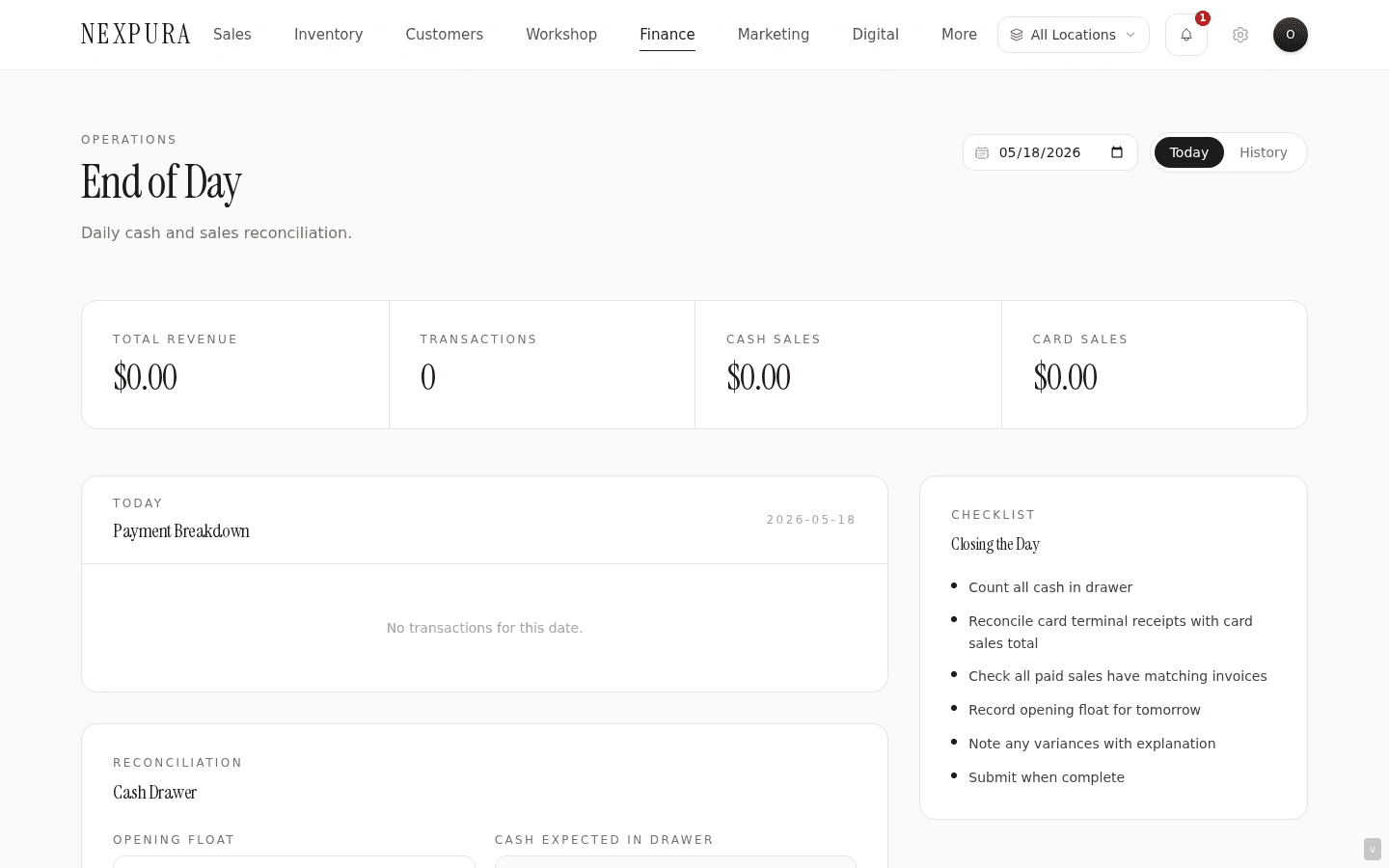
Go to /eod when the till is closing. The page lands on the Today tab with today's date picked; the stat strip across the top shows Total Revenue, Transactions, Cash Sales, and Card Sales for the day so far. If your tenant has multiple locations, the location selector at the top of the page picks which drawer to close.
2. Confirm the Payment Breakdown reflects reality
The Payment Breakdown panel lists each tender row with a non-zero amount for the day. Walk through it comparing against the till tape and the card-terminal's settlement total:
- Cash should match the till tape's cash subtotal before any refunds.
- Card / EFTPOS should match the card terminal's settlement total for the day. If there's a small discrepancy here, the common cause is a card-on-file payment recorded against an invoice (via the Stripe payment link) that doesn't correspond to a physical card-terminal swipe.
- Bank Transfer should match any transfer-method sales recorded today — usually invoiced sales paid via direct deposit.
- Gift Vouchers is the dollar value of vouchers redeemed today (also includes store-credit redemptions). This is voucher liability being drawn down, not new money in.
- Layby Payments is the sum of layby instalments collected today — partial payments against a layby that isn't yet complete.
- Split / Mixed covers sales paid with more than one tender (cash+card, voucher+card, voucher+cash). For voucher-split sales the EOD decomposes them — the voucher portion lands in Gift Vouchers, the remainder lands in Cash or Card depending on the split type. A sale of $1,000 paid as $200 voucher + $800 card shows $200 in Vouchers and $800 in Card, not $1,000 in Split.
Cash and card refunds for the day appear as negative rows beneath the tender breakdown. Net Revenue at the bottom is the sum of tenders minus refunds — the headline figure for the day.
3. Enter the opening float
Type the cash you started the day with into Opening Float. This is the till change that was sitting in the drawer before the first customer arrived. If you closed yesterday by leaving a Closing Float in the drawer, that figure is what today's Opening Float should be. The field defaults to 0 — for tenants that empty the till at close, that's correct; for tenants that leave a fixed float, enter the carryover amount.
The Cash Expected cell below updates live as you type the opening float — Cash Expected = Opening Float + Cash Sales − Cash Refunds. This is what should be in the drawer right now if no errors occurred.
4. Count the drawer and enter Cash Counted
Count every note and coin in the drawer. Enter the total into Cash Counted. The Variance cell updates live — Cash Counted minus Cash Expected.
- Variance of zero — perfect close, drawer balances to the cent.
- Variance positive (Over) — more cash in the drawer than expected. Common causes: a cash sale rung up with the wrong tender, a return processed incorrectly, the float being entered low.
- Variance negative (Short) — less cash than expected. Common causes: a cash refund processed via the till without being recorded in /refunds, a sale walking out as cash but recorded as card, or genuine till shortage.
Small variances (a few dollars either way) are normal across a busy trading day. Big variances warrant investigation before submitting — walking the till tape against the sales list at /sales for the day usually surfaces the misrouted transaction.
5. Enter the closing float and notes
Closing Float is the cash you're leaving in the drawer overnight for tomorrow's opening float. The rest of the cash is being banked or removed. Many jewellers keep a fixed $200-$500 float for change; others zero the drawer each night.
The Notes field is free-text — a place for the closer to record explanations for variances, edge cases the day produced (a customer returning a voucher purchase, a power outage that interrupted the card terminal, a deposit on a bespoke job that hasn't yet hit the till tape). Notes surface on the reconciliation history table and on the audit trail.
6. Save Draft or Submit and Close Day
Save Draft persists everything you've entered without locking the day — you can come back, adjust the cash counted, change the notes, revisit the opening float. A draft is appropriate when you're mid-count and being called away from the till.
Submit and Close Day flips the status to submitted, stamps the submitted_at timestamp and the closing staff member's user ID, and writes the audit event. From here the day is locked — the form fields become read-only, the action returns “Re-opening would invalidate the audit trail” on any attempt to overwrite. Submit when the count is reconciled and you're confident the figures are final.
7. Review past closes in the History tab
The History tab lists every submitted EOD row in reverse chronological order. Each row shows the date, total revenue, transaction count, cash variance (green for zero, red for non-zero), and the submitted status. Click View on a row to load that day's data back into the Today form as read-only — useful when revisiting a known short day or when the bookkeeper asks for the breakdown of a specific date.
8. Close a day that was missed
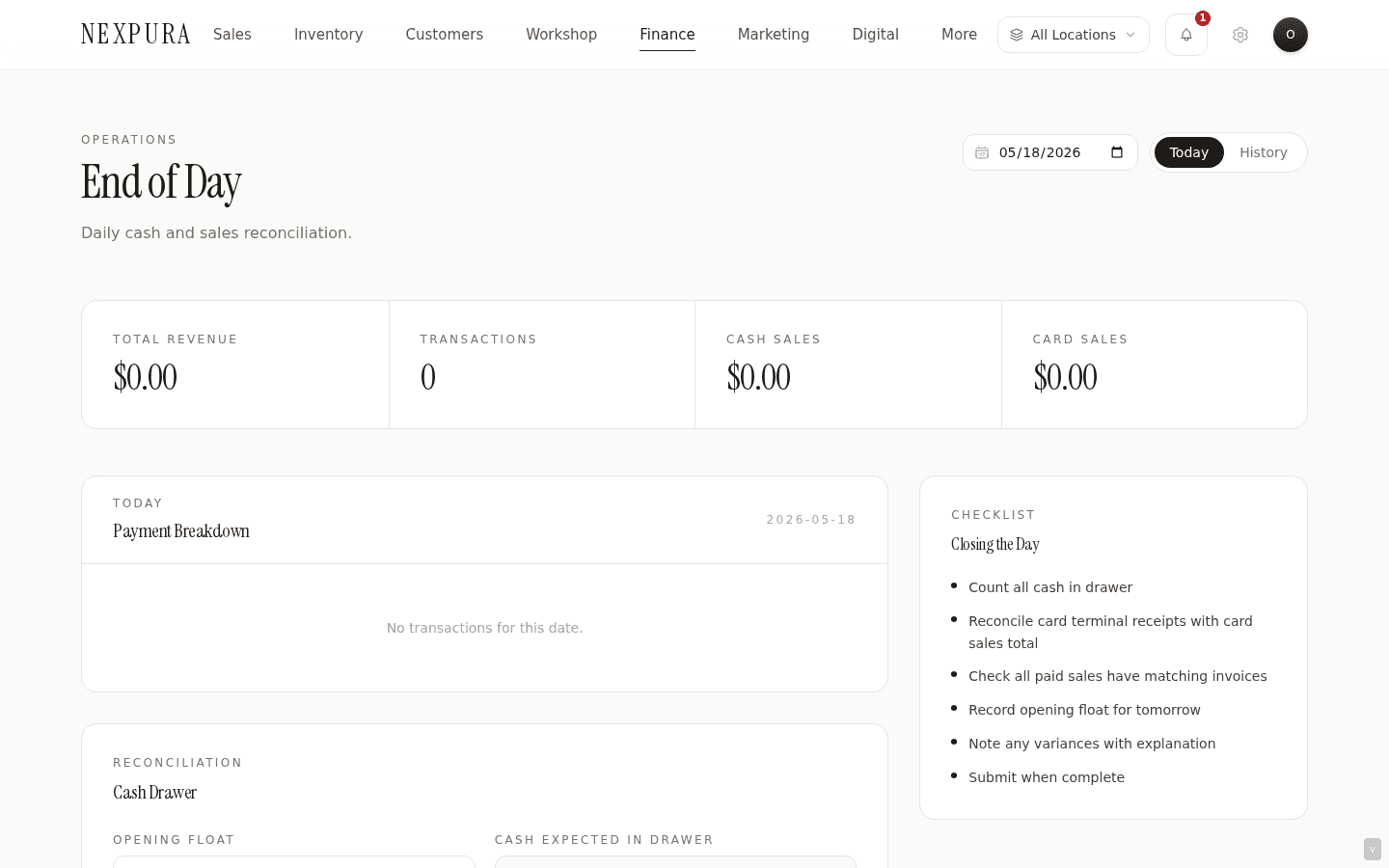
If you missed closing yesterday (the day got busy, the closer didn't do EOD), the date picker on the Today tab lets you select a past date. The page reloads with that date's tender totals, refunds, and any draft reconciliation that was started. Complete the reconciliation and submit; the audit log records the close happening today, for that prior reconciliation_date. Tenants on the A1 money-correctness rollout get cleaner line-item-level aggregation here — the v2 path sources from sale_items.line_total rather than sales.total, which matters for sales that were adjusted after the fact.
Common questions
Why are vouchers grouped under one Gift Vouchers category instead of separating issued from redeemed?
Because at EOD the question is “how much voucher liability moved today,” and the breakdown that matters operationally is voucher-as-tender (cash equivalent customers spent) versus voucher-as-product (sale of a new voucher to be redeemed later). The Gift Vouchers row in the EOD breakdown is voucher-as-tender — the dollar value of vouchers redeemed against today's sales. New voucher sales (a customer paying $200 to receive a $200 voucher) land in the Cash, Card, or Transfer row depending on how the customer paid for the voucher, not in the Gift Vouchers row.
This shape keeps the cash-drawer math honest: Cash Expected reflects the cash the till should hold, regardless of whether a voucher product was sold. Voucher liability accounting (how much outstanding voucher balance the tenant carries) is a separate report on /financials — the EOD's job is to balance the drawer, not the voucher book.
How does the EOD handle a partial-day shift change — different staff on the morning and afternoon?
EOD is closed once per day per location — the system doesn't segment a single trading day into multiple shifts at the reconciliation surface. For tenants with a true shift change (morning cashier hands off to afternoon cashier), the operational shape is for each cashier to do their own count-down at handover into a written log (or the Notes field on a draft EOD) and for the end-of-day closer to do the canonical close against the full day's tender totals. The draft EOD is the natural place for an interim count — save mid-day with the partial cash count and a note, the afternoon closer comes back to it.
The cashier-identity attribution that some tenants need (which staff closed the till when, for variance investigation) shows up on the audit trail as the submitter's user ID and timestamp. A future per-shift breakdown is on the product roadmap but isn't shipped today; the workaround for now is a per-shift cash-count log layered on top of the daily EOD.
I have three locations and the same cashier handles drawer counts at all three. Do I close them in any particular order?
No required order — each location's reconciliation row is independent. Pick the location selector for the location you're counting, complete the form, submit. Switch to the next location, repeat. The KPIs on /financials aggregate across all locations regardless of the order they were closed; the History tab on /eod shows the rows in submit-time order per location.
For tenants with location-restricted staff (cashier A only sees location A, cashier B only sees location B), each cashier closes their own location independently. The owner or manager with multi-location access sees the full set on History and on the Finance hub.
A voucher was issued today and redeemed today for the same customer. How does that show up in the EOD?
Two rows in two tenders. The voucher sale lands in the tender the customer paid with — so a cash-paid voucher purchase adds to the Cash row. The voucher redemption against the same day's purchase lands in the Gift Vouchers row (voucher-as-tender) and the rest of that sale's payment (if any) lands in the relevant cash or card row. Net effect: the voucher liability went on and immediately came off again, the EOD shows both halves transparently. This is unusual but it's clean — same-day voucher round-trips look identical to a multi-day round-trip from the EOD's perspective, which is the right shape for cash-drawer math.
The Cash Expected formula uses Opening Float + Cash Sales − Cash Refunds. What about petty-cash withdrawals during the day?
Petty-cash withdrawals aren't modeled in the EOD formula today — the drawer is treated as a closed cash system between opening float and closing float. If your store withdraws cash mid-day (for a supplier payment, a quick stock-up, change for a large note from the safe), the variance will reflect that withdrawal as a negative cash variance. The right shape is to record the withdrawal as an expense on /expenses/new with payment-method cash, and note it in the EOD Notes field. The drawer comes up short against Cash Expected by the withdrawal amount; the expense row carries the accounting.
An “in/out events” surface that lets you record drawer movements alongside the count is the cleaner long-term shape and is on the product roadmap; the cash-as-expense workaround covers the gap for now.
Troubleshooting
Cash Sales total looks wrong against the till tape
Symptom: the Cash row in Payment Breakdown doesn't match the till tape's cash subtotal for the day. Cause: two common ones. A split-tender sale where the cash portion of a voucher+cash split is being counted under Cash (correct) but the operator expected it under Split (which is the legacy shape). Or a sale was rung up as “mixed” payment_method without a voucher portion, which lands in the Split / Mixed row. Fix: click into the day's sales at /sales filtered to today, sort by payment method, and walk the cash-method sales against the till tape line-by-line. The misrouted-payment cause becomes obvious on inspection.
Submit returns “reconciliation is already closed”
Symptom: the Submit and Close Day button surfaces the already-closed error. Cause: expected. Someone (often the morning closer for the previous day; or another cashier on a shared location) already submitted today's EOD for this location. Submitted rows are terminal — re-opening would invalidate the audit trail. Fix: switch to the History tab and find the submitted row to confirm what was reconciled. If the prior close was wrong (counted under the wrong drawer, miscounted, missed a category), contact support to record an adjustment journal — the canonical fix is an adjustment entry, not re-opening the closed day. The locked-day discipline keeps the audit trail trustworthy for tax-filing season.
Variance shows huge negative number on a multi-location tenant
Symptom: Variance reads -$5,000 or similar on a tenant with multiple stores. Cause: the location selector is set incorrectly — you're counting Store B's drawer against Store A's sales. The page location-scopes both sides of the formula, but only if the location selector is right. Fix: switch the location selector to the location whose drawer you're counting; the numbers refresh. Confirm via the location badge near the heading and the location name that surfaces in the Payment Breakdown panel's caption. If you're a location-restricted staff member with access to only one location, this can't happen — the selector hides.
Today's sales aren't showing up in EOD and it's 6 PM
Symptom: the stat strip shows zero transactions despite real sales today. Cause: two possibilities. The tenant timezone may be misconfigured at /settings/business-profile — if it's set to UTC instead of Australia/Sydney, the day boundary is off by up to 11 hours and today's morning sales are landing in yesterday. Alternatively, the date picker on /eod is set to a past date (loading a History view). Fix: verify the date picker is on today. If the timezone's wrong, an owner or manager fixes it under business profile — the EOD will then pick up the right boundaries on next load. The fix doesn't retroactively re-bucket sales already recorded under the wrong timezone's day; those will be in the EOD they currently belong to and the cleanup is a manual reconciliation.
Submit fails with “Only owner or manager can close end-of-day reconciliation”
Symptom: you can view the EOD totals but the Submit button returns the role-denied error. Cause: expected. Reading totals is matrix-configurable via view_eod_totals; closing the day is a hard-role gate on owner and manager that the matrix can't loosen. The gate-shape discipline keeps the close as a security- non-configurable mutation. Fix: save as draft, hand off to an owner or manager to do the canonical close. The draft's cash counted, notes, and float entries persist so they don't need to be re-typed; the owner / manager reviews and submits.
Related
- Finance hub and reports — EOD-submitted status surfaces on the hub as the “Reconciliation Started” tile; closed days feed the dashboard KPIs
- Processing a sale — every tender choice in the POS payment modal corresponds to a tender row on the EOD; misrouted-payment fixes start at the sale detail page
- Refunds — cash and card refunds for the day surface as negative rows in the EOD Payment Breakdown; refunds without a matching sale require the orphan-refund workflow
- Vouchers and gift cards — voucher redemptions land in the Gift Vouchers EOD row; voucher sales land in whatever tender the customer paid with for the voucher itself
- Locations and multi-store — multi-location tenants close one EOD per location; the location selector drives both the read and the write scope
- Business profile — where the tenant timezone is configured; an incorrect timezone shifts the EOD day boundary and produces phantom variances