Marketing & automations overview
How the four marketing surfaces — segments, templates, campaigns, automations — compose into outbound workflows. The /marketing hub as orientation, KPIs, and quick actions; the data model that ties recipient cohorts to messages to a one-time send or a recurring intent.
Quick reference
- Marketing in Nexpura is four surfaces stacked into one workflow: /marketing defines the cohort, /marketing defines the message, /marketing/campaigns ties them together for a one-time send, and /customers/automation captures recurring per-event intent.
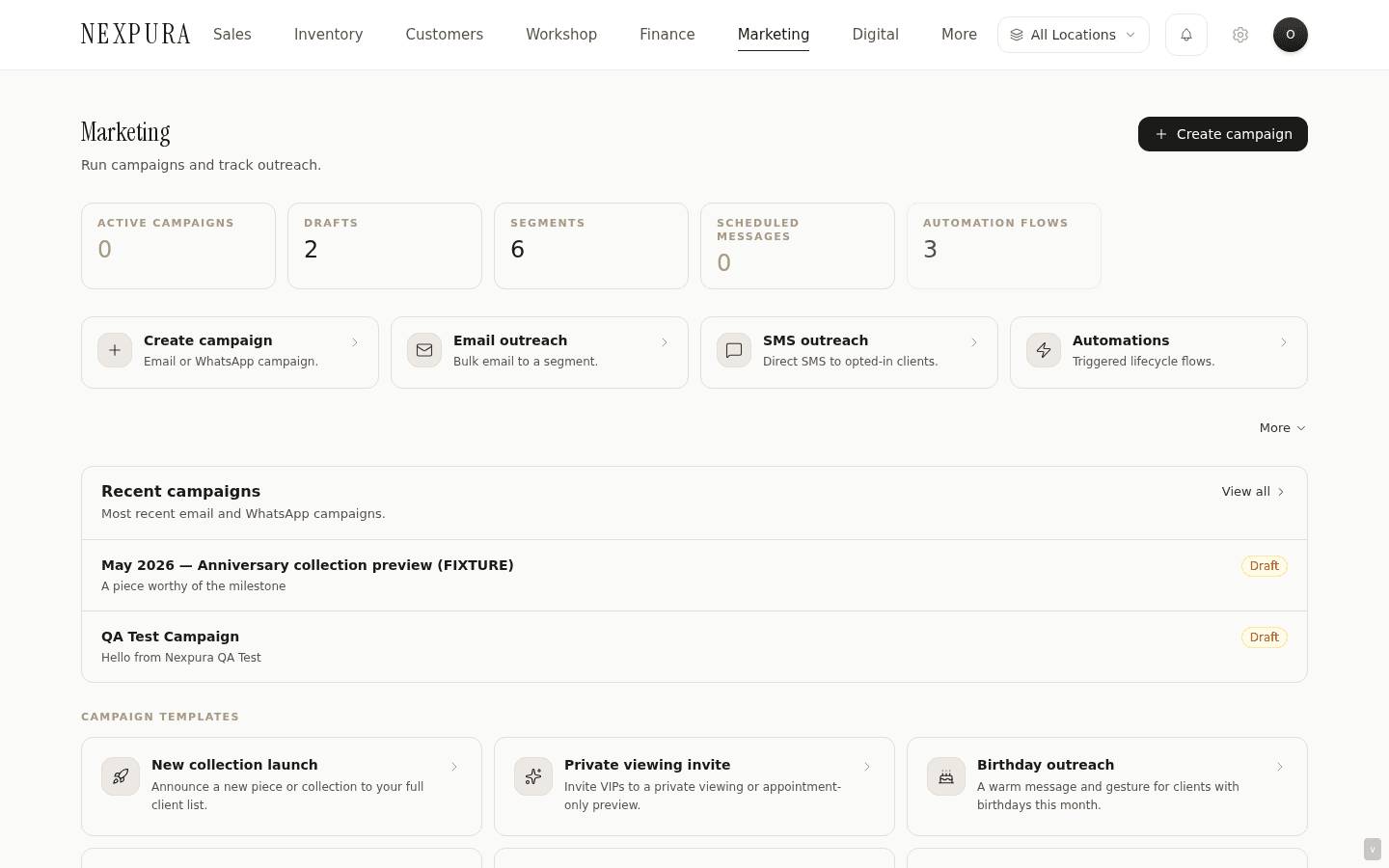
- The hub at /marketing is the orientation page. KPI strip across the top (active campaigns, drafts, segments, scheduled messages, automation flows on), quick-action tiles into the four working surfaces, a recent-campaigns panel, and a campaign-templates strip for the most-used outreach shapes.
- Data model: customers belong to a tenant; segments are rule-driven cohorts of those customers (system or custom); templates are reusable subject + body scaffolds with merge variables; email_campaigns rows tie a segment / tag / manual recipient list to a template or freeform body and dispatch on demand; marketing_automations rows persist the per-event toggles + chosen template + lead-time settings for the automation runner.
- Permissions: campaign create / edit / send and automation toggle are owner / manager only — they dispatch customer-facing messages on your tenant's behalf. Salesperson, workshop, and accountant roles are read-only on these surfaces.
- Adjacent: the 1:1 outreach path is documented under clienteling workflow — “send everyone in this segment” goes through marketing; “send this one customer a warm 1:1” goes through the customer detail page's send-email modal.
Walkthrough
1. Land on the marketing hub
Go to /marketing. The page opens with five KPIs across the top — active campaigns (scheduled or currently sending), drafts, segments, scheduled messages (campaigns with a future send time), and automation flows that are toggled on. Below the KPIs, a 4-tile row of quick actions: Create campaign, Email outreach, SMS outreach, Automations.
2. Pick the right surface for the work
The four surfaces correspond to four operator questions. Who do I send to? lands you on /marketing — the cohort definitions live there. What does the message say? lands you on /marketing — the reusable scaffolds with merge variables live there. Send this segment this template right now (or at this scheduled time) lands you on /marketing/campaigns — that's the binding surface. Whenever a customer's birthday rolls around, send them this template lands you on /customers/automation — the recurring intent surface.
Most outbound work is either a one-time campaign send (a launch, a private viewing invite) or a recurring per-event flow (every birthday, every repair-ready notification). The campaign surface handles the first; the automations surface handles the second.
3. Read the data model
A campaign carries: a name, a subject, a body (or a template reference that expands to subject + body at send time), a recipient type (all / segment / tags / manual), a recipient filter (the segment ID, the tags array, or the explicit customer IDs), an optional scheduled_at timestamp, and a status (draft / scheduled / sending / sent). Every recipient who receives the campaign at send time gets a row recorded on their customer detail page's Communications tab so the touch is visible per-customer, not buried in a separate marketing log.
An automation carries: an automation_type (birthday, anniversary, repair_ready_reminder, reengagement, post_purchase, appointment_24h / appointment_1h, and the seasonal types), an enabled flag, a settings object (lead-time, qualifiers), and a template_id pointing at the email template the runner will dispatch when it fires. Automations don't have a status field — they're on or off, and when on they'd fire continuously against matched customers.
4. Understand the automation execution layer
The automations surface ships the configuration UI in full — every per-event toggle, the lead-time pickers, the template selector, the test-run dry-preview that counts the matched customers for today. What the automation toggles don't yet do is fire unattended. The cron-runner layer that reads the marketing_automations table and dispatches messages when matched customers cross the trigger threshold isn't wired up. Both the automations page and the related problem-page diagnosis carry the honest disclosure.
The interim posture: capture the toggles to record intent today, then run the equivalent work through the campaign builder against the matched segment — birthday this month becomes a campaign sent at the Birthday segment; lapsed customers becomes a campaign sent at the Inactive segment; repair-ready reminders are sent 1:1 from the customer detail page. When the runner lands, every toggle that's on starts firing without operator intervention; configured tenants don't need to revisit anything.
5. Find the related surfaces
A few cross-section adjacencies are worth knowing. The customer segments page mirrors a customer-side view at /customers/automation — the same marketing_automations rows, presented per-segment instead of per-automation-type. The campaign templates strip on the hub deep-links into /marketing/campaigns/new?template=... with the right template pre-selected. The bulk-email and SMS-campaign surfaces are the no-template-needed equivalents — type subject + body, pick recipients, send. The Mailchimp integration at /docs/integrations-and-data/mailchimp flows consenting customers to your Mailchimp audience for outreach you'd rather run in that tool.
Common questions
Why are segments, templates, and campaigns separate surfaces instead of one wizard?
Each one is reusable in its own right. A segment you define once gets used by every campaign and every automation that targets that cohort — the VIP segment built once is the recipient list for a private-viewing invite this month, a thank-you note next quarter, and the standing VIP-birthday automation. A template you write once is the reusable message for the next ten launches with the same shape. If they were collapsed into a wizard, every campaign would carry a fresh segment-definition and a fresh body, and the second campaign with the same recipient list and the same message would be a copy-paste exercise.
The cost is one more surface to learn for the first campaign; the win is every subsequent campaign is faster and the cohorts and messages stay consistent across the touchpoint history on each customer's record.
Why two automation surfaces — /customers/automation and /customers/automation?
Two different lenses on the same underlying marketing_automations rows. /customers/automation leads with the automation-type perspective — “here are the event-triggered automations Nexpura recognises, and here's the template each will dispatch when fired.” /customers/automation leads with the customer-segment perspective — “here are your segments (VIP, Inactive, Birthday, New) and here are the automations that target them.” Same toggles under both, same persistence; each surface is optimised for the operator question that brought them there.
Both surfaces are honest about the execution-layer gap. Whichever you land on, the picture of what fires today and what doesn't yet is the same.
How do segments stay in agreement with the customer book if customers change daily?
System segments are computed dynamically — the VIP cohort reads the is_vip column at lookup time, the Inactive 90+ cohort reads the updated_at timestamp at lookup time, the Birthday this month cohort reads the birthday column with a 30-day window. The count beside each segment refreshes when the segments page loads, or you can hit the manual Refresh count affordance.
Custom segments persist the rule shape (a typed rule object with the qualifier) and recompute the same way. The persistence is the rule, not a snapshot of which customers matched at definition time — a campaign sending today against a custom segment built three months ago picks up customers who newly qualify, and drops customers who fell out of qualification.
Where do touchpoints get recorded so I can avoid over-messaging a customer?
Every outbound message — campaign send, 1:1 send, automation dispatch when the runner lands, repair- ready notification, invoice receipt — records to the customer's Communications tab on their detail page. The tab stacks chronologically with the type labelled (campaign, 1:1 email, system notification, etc.), so a staff member preparing for a customer conversation can read the recent outbound history in one place.
There's no automatic cooldown or deduplication today — the system trusts that staff are reading the tab before composing a touch. An explicit cooldown affordance is on the backlog alongside the automation execution loop, since the same friction is more relevant the moment automation fires alongside manual outreach.
Channel — does marketing send by email, SMS, or both?
Email and SMS. The email-campaigns and bulk-email surfaces send by email; the SMS-campaigns surface sends text messages from Nexpura's number. The legacy bulk-SMS address redirects to SMS campaigns. Nexpura doesn't send WhatsApp campaigns. Per-campaign you pick the surface that fits the message; the recipient picker (segment / tags / manual) is the same on both.
Automations (when the runner ships) will route messages through the channel each automation type is configured for; the template the automation dispatches is the same template you'd pick for a manual campaign with the same shape.
Troubleshooting
The marketing hub KPI “Scheduled messages” shows campaigns I expected to have sent by now
Symptom:a campaign scheduled for an earlier time still shows under the Scheduled-messages KPI; no “sent” row appears on the campaign or in recipients' Communications tabs. Cause: documented in the campaigns and bulk send honest-disclosure section: scheduling a campaign persists the schedule on the row, but the runner that reads scheduled campaigns and dispatches them at the configured time isn't wired up. The campaign sits in scheduled status until someone manually sends it. Fix:open the campaign and hit Send now; it'll dispatch immediately. Until the scheduled-send runner ships, schedule-then-walk-away isn't the reliable path — send-now from a calendar reminder is.
Automation flows KPI shows N enabled but customers aren't receiving the automated messages
Symptom:the hub shows several automations enabled, the automations page confirms the toggles, but customers who should be matched (e.g. birthdays this week) aren't receiving anything. Cause: documented in the automations honest-disclosure section: the configuration UI ships the toggles and persists them; the cron runner that reads marketing_automations rows and dispatches messages doesn't yet exist. The enabled flag is intent, not execution. Fix: until the runner ships, use the manual equivalent — the Birthday this month segment with a campaign targeted at it covers the same audience the birthday automation would, run once a month instead of trickling daily. The clienteling workflow page documents the same pattern for re-engagement (Inactive 90+).
I can see the marketing hub but the quick-action tiles or Create campaign button don't do anything for me
Symptom: the page renders for your role but the destinations return a permission error. Cause:the hub itself is broadly visible (KPIs read from tenant data, not from per-user gates), but the create / edit / send actions are owner / manager only — salesperson, workshop, and accountant roles can read but not write. The action attempt surfaces “Only owner or manager can ...” inline. Fix: ask an owner or manager to perform the action, or to elevate your role if your responsibilities have changed. Roles are managed under settings.
Recent-campaigns panel is empty even though I know campaigns exist
Symptom:the hub shows the empty-state “No active campaigns” even though /marketing/campaigns lists rows. Cause: the hub panel reads the five most-recent campaigns by created_at; if those five are all in draft status, the active-campaigns KPI is 0 (it counts scheduled or sending) and the empty-state copy reads “no active campaigns” even though drafts exist. Fix:the copy is correct — drafts aren't active. Open /marketing/campaigns to see the full list including drafts; promote a draft to scheduled or send it now to activate it.
I want one bulk-email send to a segment without creating a saved campaign row
Symptom: you want a one-off send without the campaign-row overhead — subject, body, pick a segment, send, done. Cause: expected; the campaigns surface persists a row for every send so the touch is recorded against each customer's Communications tab. Fix: use /marketing/bulk-email — same recipient picker (segment / tags / manual), same subject + body editor, dispatches inline without a saved-campaign row. The send still records to each customer's Communications tab so the touchpoint history stays complete.
Related
- Related: The problem this solves — “The forgotten anniversary” — the diagnostic surface for the automation-execution gap that the automations page documents
- Customer segments — defining the recipient cohorts that campaigns and automations target
- Message templates — the reusable subject + body library with merge-variable extraction
- Campaigns and bulk send — one-time outbound from segment + template, manual and scheduled
- Marketing automations — per-event recurring intent (configuration ships, runner being built)
- Clienteling workflow — the customer-side framing of how segments + campaigns + 1:1 outreach compose