Clienteling workflow
High-value-customer outreach end-to-end — VIP tagging, the segments surface, 1:1 customer email, the polymorphic notes timeline, and how to combine them for a relationship-driven outreach cadence. Manual surfaces ship in full; the automation execution loop that fires re-engagement / lapsed-customer / post-purchase / appointment-reminder messages without anyone clicking is being built next.
Quick reference
- Tag a customer VIP on the add / edit form to mark them for the high-value cohort. Selecting the VIP chip writes both the string into the tags array AND flips the is_vip column on the row, so segments and filters read it fast.
- The customer hub at /customers carries a VIP clients KPI and a ?segment=vip filter link in the More dropdown. The dedicated segments page at /marketing also exposes the VIP cohort alongside other dynamic cohorts (Inactive 90+ days, Birthday this month, New customers).
- 1:1 outreach lives on the customer detail page — the Send email button beside the email in the hero card opens a compose modal; sends record to the customer's Communications tab. (Requires the edit_customer permission.)
- Notes on the customer detail page's Notes tab — the polymorphic timeline — is the in-context narrative surface for relationship context. Different staff stack chronologically; the timeline is append-style with edit / delete gated on author-or-admin.
- Batch outreach to a clienteling cohort runs through the marketing campaigns surface (covered separately under Marketing & Automations). The campaigns builder lets you target a segment with a template and a one-time send.
- The customer-segment automation surface at /customers/automation carries toggles for Birthday Greeting, Anniversary Reminder, Repair Ready Reminder, Re-engagement (Lapsed), Post-purchase Thank You, and appointment reminders. The toggles persist; what they don't yet do is fire automatically — see the honest disclosure section below.
Walkthrough
1. Identify your high-value customers
The customer hub at /customers surfaces a VIP clients KPI in the strip. Click it (or use the More dropdown's VIP clients link) to filter the list down to the existing VIP cohort. The segments page at /marketing carries the same cohort and adds dynamic ones — Inactive 90+ days (customers without an interaction in the last 90 days), Birthday this month, New customers (joined in the last 30 days).
The static tag-driven VIP cohort and the dynamic activity-driven cohorts serve different purposes. VIP is “customers we've decided are worth a relationship effort” — the operator names them. Inactive 90+ is “customers who've gone quiet and might re-engage if we reach out.” Birthday this month is “customers with a date prompt we can hang a touch off.”
2. Tag a customer VIP
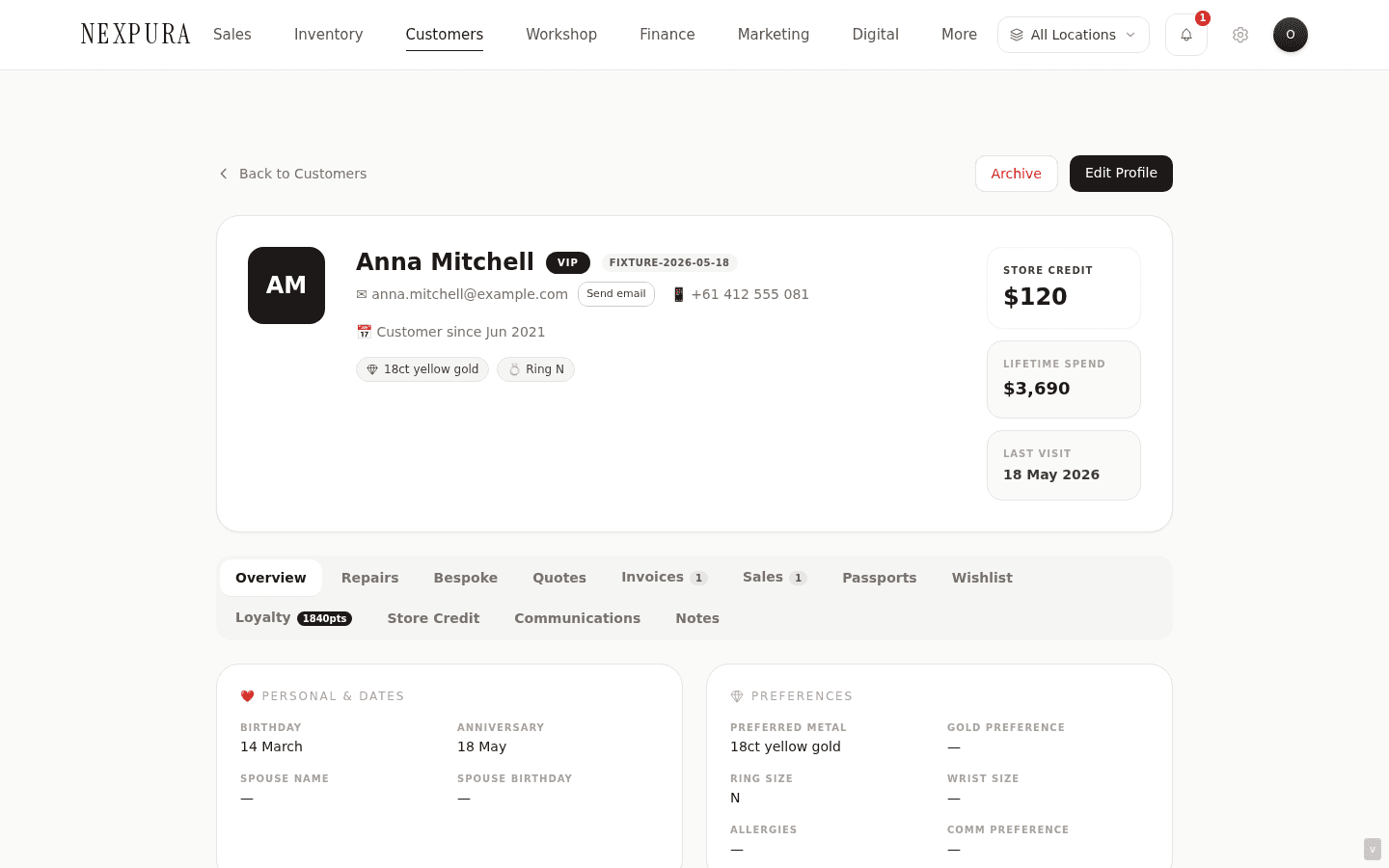
Open the customer's detail page, click Edit Profile, scroll to the Tags card, click the VIP chip to select it, save. The save flow writes the string into the tags array AND flips the row's is_vip boolean. The hero card on the detail page now renders the VIP pill next to the customer's name; the customer hub list shows the badge in the tags column; the KPI count includes them; the segments page picks them up; the dynamic ?segment=vip filter surfaces them.
The VIP tag is intentionally a soft signal — anyone with the edit_customer permission can apply or remove it. There's no separate “promote to VIP” workflow with manager approval; the trust model assumes your staff are the ones best placed to decide who's a VIP for your store. If you want stricter governance, the audit log captures every tag change with the user who made it.
3. Record relationship context in notes
The customer detail page's Notes tab — the polymorphic timeline — is the place to capture the “why this customer matters” context that doesn't belong in a structured field. The partner's name, the upcoming family event, the preferred contact hour, the gift-giving rhythm, the piece they keep talking about wanting but haven't ordered yet. Notes are written by staff, for staff; they stack chronologically, with each note carrying author and timestamp, and edit / delete affordances gated on author-or-admin.
The legacy plaintext notes textarea was retired in favour of this timeline because the textarea pattern broke down with multiple authors — one staff member's save would overwrite another's. The timeline stacks every entry separately. Old plaintext column data was migrated as a single “legacy note” entry per customer so no prior context was lost.
4. Send a 1:1 email
The hero card on every customer detail page carries the customer's email and a small Send email button beside it (visible to operators with the edit_customer permission, hidden in read-only / review mode). Click it to open a compose modal — subject and message body, both required, plain text with line breaks preserved.
Send is contractual: the modal only confirms “Sent” when the email provider confirmed the send. If the provider returned an error, the modal surfaces the error inline rather than silently failing. Successful sends record to the customer's Communications tab — type email_receipt, status the provider returned, subject, full body, timestamp. A pattern of one-off touches against your VIP cohort builds a real touchpoint history visible on the Communications tab.
5. Build a segment-targeted campaign
For batch outreach to a clienteling cohort — “send all my VIPs the new arrivals preview,” “everyone who hasn't been in for 90 days gets a we-miss-you note,” “Birthday this month gets a curated piece pick” — the right tool is the campaigns surface at /marketing/campaigns. New campaign, pick the segment, pick a template, queue the send. The campaign builder is documented under Marketing & Automations.
The output is a one-time send: every customer in the segment at the moment the campaign runs gets the configured message. Channel is configurable per campaign (email is the most-used; other configured surfaces are available depending on your tenant setup). Every recipient gets a row in their Communications tab so the touch is recorded against each customer, not buried in a separate marketing log.
6. Configure the per-segment automations
The customer-segment automation surface at /customers/automation carries the toggles for the date-driven and event- driven outreach automations — Birthday Greeting, Anniversary Reminder, Repair Ready Reminder (fires when a repair sits uncollected past N days), Re-engagement Lapsed (fires when a customer goes inactive past N months), Post-purchase Thank You, Appointment 24h / 1h reminders, and seasonal campaigns. Each toggle persists; toggling is owner / manager only.
Each automation has settings — the lead-time offset, the configured template, the channel. The configuration UI is the operator-facing setup surface. What the toggle being on doesn't yet do is fire the message automatically — see the honest disclosure below.
Honest disclosure
The clienteling workflow has two layers — the manual / configured layer and the auto-fire layer. The split:
What's shipped today
Every manual surface is fully built. VIP tagging, segment definition, the VIP cohort KPI on the customer hub, the segments page's dynamic cohorts (VIP / Inactive / Birthday / New), the 1:1 customer email modal with provider-confirmed send recording, the polymorphic notes timeline on the customer detail page with multi-author chronological stacking, and the campaigns builder that sends a one-time message to a targeted segment — all of these work end-to-end. An operator can do the full clienteling workflow today: identify VIPs, tag them, capture context in notes, send 1:1 touches, run batch campaigns at segment cohorts, see every outbound recorded on each customer's Communications tab.
The automation configuration UI is also shipped — every date-driven and event-driven outreach automation has a toggle on /customers/automation (and the parallel marketing-automation surface at /customers/automation), with settings, template selection, and a dry-run preview that returns the count of customers who'd be matched today (for birthday and anniversary types; other types report “test run not yet available”).
What's in build
The execution loop behind the automation toggles. The toggle for Re-engagement (Lapsed) exists; the cron job that finds customers who've crossed the 90-day-inactive threshold and fires the configured template — that doesn't yet run. Same for Birthday Greeting, Anniversary Reminder, Repair Ready Reminder, Post-purchase Thank You, and the appointment reminders. Toggling them on persists the preference; no message dispatches in response without a manual action.
The interim posture: configure the toggles to capture intent today, then use the manual surfaces to do the equivalent work — the /reminders dashboard surfaces birthday and anniversary prompts a staff member can act on by clicking through to the customer and sending via the email modal; the Inactive 90+ days segment is buildable on /marketing and a campaign targeting it runs the re-engagement work as a one-off batch instead of an ongoing trickle. Each manual surface is fully functional; what's missing is the unattended “runs while you're asleep” half.
The cron-runner / worker that reads the configured automations and dispatches messages is the next layer up. When it ships, every toggle that's on today starts firing without operator intervention — which is why we ship the configuration UI first, so intent persists and the day the runner lands, tenants who've set up don't need to revisit anything.
Talk to us if these are load-bearing for your store.
Common questions
Why two automation surfaces — /customers/automation and /customers/automation?
Two different lenses on the same underlying configuration. /customers/automation leads with the customer-segment perspective — “here are your segments (VIP, Inactive, Birthday, New) and here are the automations that target them.” /customers/automation leads with the channel / template perspective — “here are the automations, and here's the template each one will dispatch when fired.” Same toggles under both, same persistence, but each surface is optimised for the operator question that brought them there.
A staff member thinking “how do I touch my VIPs more?” lands on /customers/automation naturally and sees the relevant toggles in the context of the segment. A staff member thinking “does our birthday template look right before I turn the automation on?” lands on /customers/automation and sees the template selection clearly. Both surfaces are honest about the execution gap; whichever surface you land on, you get the same picture of what fires today and what doesn't.
Why is VIP a free-form tag instead of a separate tier system (Gold / Platinum / Diamond clienteling)?
Resisting the urge to over-engineer the relationship taxonomy. Most stores end up with one meaningful tier — “the people we genuinely prioritise” — and a long tail of customers who don't need a finer distinction. A three-or-four-tier system invites every store to spend a week categorising their book and then never use the tiers again. One tier (VIP, present- or-absent) keeps the operational decision sharp: this customer gets the relationship effort, or they don't.
For stores that genuinely want finer-grained tiers, the tags array is unlimited — add “VVIP” or “Tier-1” or “Founders-Circle” as additional free- form tags, and they show up in the filter and segments surfaces. The system doesn't prevent the finer breakdown; it just doesn't default to one. Loyalty tiers (Bronze / Silver / Gold / Platinum) are a separate axis driven by points balance, not by relationship judgement — useful for entirely different reasons.
Why does the 1:1 email surface record to the customer's Communications tab when marketing campaigns also record there?
Touchpoint completeness. The point of the Communications tab is that any staff member opening a customer can see every outbound message they've received from your store, regardless of which surface dispatched it. A staff member preparing for a customer phone call wants to see “we sent her the new-arrivals campaign last Tuesday AND a follow-up 1:1 from Mark on Friday” — the two touchpoints together are the conversation context, not separately.
If 1:1 sends and campaigns recorded to different surfaces, the natural mistake is to send the same customer the same content twice — “I see no record of us emailing her about this, let me send it now” when actually the campaign covered it last week. One Communications tab, every outbound record, no missed history.
How do I find customers who've gone quiet today, instead of waiting for the re-engagement automation to ship?
The Inactive 90+ days segment on /marketing is the manual equivalent. The cohort is dynamically calculated — customers without an update timestamp in the last 90 days — and renders with a count beside it. From the segment, you can run a one-time campaign at the cohort (the campaigns builder accepts a segment ID as a target), or open the segment's member list and touch customers individually.
The same shape of work the automation would do when it ships, run by hand. The campaign send records on each customer's Communications tab the same way the automated send eventually will, so when the runner lands you've already built the touchpoint history.
How do I know my staff aren't triple-touching a VIP across the campaigns and the 1:1 surface?
Open the customer's detail page and read the Communications tab. Every outbound message — campaign, 1:1, repair-ready notification, invoice receipt, etc. — surfaces chronologically with the type labelled clearly. If you see three sends to the same customer in the same week, that's either valid (three different contexts that happened to fall together) or a redundant touch your team should know about.
There's no automatic deduplication or cooldown today — the system trusts that staff are reading the Communications tab before composing a touch. An explicit cooldown / dedup affordance (e.g. “this customer has received 3 messages this week, are you sure you want to send a fourth?”) is on the backlog and would slot in alongside the automation execution loop work, since the same friction is more relevant the moment automation fires alongside manual touches.
Troubleshooting
VIP segment shows zero customers but my list is full of VIPs
Symptom:the segments page's VIP cohort reads 0, but the customer list shows multiple customers with the VIP badge. Cause: the segment filter reads the is_vip column, not the tags array. If customers were tagged via a CSV import or a direct DB write that set the tag but not the column, the badge renders (the detail page reads either source) but the column is false, so the segment misses them. Fix: re-save each customer through the edit form to sync the column — deselect the VIP chip, save, re-select, save. For many customers, ask support to run a one-line update that flips is_vip to true wherever the tags array contains VIP across the tenant.
Re-engagement automation is toggled on but no lapsed-customer emails are going out
Symptom: the Re-engagement (Lapsed) toggle is on, customers have definitely crossed the 90-day inactive threshold, but no automated email has gone out. Cause: expected today, documented in the honest disclosure section above. The cron runner that reads the automation toggles and dispatches messages isn't wired up yet; toggle state captures intent but doesn't guarantee execution. Fix:until the runner ships, build a campaign on /marketing targeting the Inactive 90+ days cohort and send it manually. The campaign records to each customer's Communications tab the same way the eventual automated send will.
1:1 email send modal returns “Email provider returned an unexpected response”
Symptom: the send action returns the generic provider-error message rather than a confirmed send. Cause:the email-send code path is deliberately strict: it only displays “Sent” when the provider returns an unambiguous success. If the provider returns an ambiguous response, the modal shows the error rather than silently claiming success. Fix:retry the send (the action is safe to retry — duplicate sends are rare and not catastrophic). If the error repeats, check the customer's email for validity (some providers reject emails with recently-bounced flags); if all else fails, contact support with the customer ID and the approximate send time so we can audit the provider log.
Send email button is missing on a customer's hero card
Symptom: the customer has an email on file but the Send email button doesn't render beside it. Cause: three possibilities. (1) Your role lacks the edit_customer permission — the button is gated. (2) The page is in review / read-only mode. (3) The customer's email field is empty (no address to send to — button conditionally hides). Fix: for (1), ask owner / manager to grant the permission via the role matrix. For (2), open the page without the review token. For (3), add the email via the edit form.
Notes timeline shows a colleague's note I want to delete
Symptom: there's a note on a customer written by another staff member, and you don't see a delete affordance on it. Cause:the notes timeline gates edit and delete on author-or-admin. Staff members can edit / delete their own notes; owners and managers can edit / delete any note. If you're a non-admin staff member, you can only modify your own entries. Fix: ask the author to remove their own note, or ask an owner / manager to remove it on your behalf. If the note carries genuinely sensitive content that needs immediate removal (an accidental PII disclosure, a customer-confidential remark mis- recorded), contact support — we can soft-delete the note server-side and log the change in the audit trail.
Related
- The customer record — the columns this workflow keys off, including the VIP tag + is_vip flag relationship
- Customer history — the Communications tab where every clienteling touch records
- Anniversary, birthday, and reminders — the date-driven prompts that feed the clienteling cadence
- Marketing segments — the dynamic-cohort definitions (VIP, Inactive, Birthday, New) and how to target them
- Marketing automations — the template-and-trigger view of the same outreach toggles