Marketing automations
Per-event recurring outbound intent — Birthday, Anniversary, Repair Ready, Re-engagement, Post-purchase, Appointment 24h / 1h, and seasonal campaigns. The configuration UI ships in full (per-automation toggle, lead-time pickers, template selection, test-run dry preview). The cron runner that reads marketing_automations rows and dispatches messages when matched customers cross the trigger threshold is being built next — toggles persist intent, automations don't yet fire unattended.
Quick reference
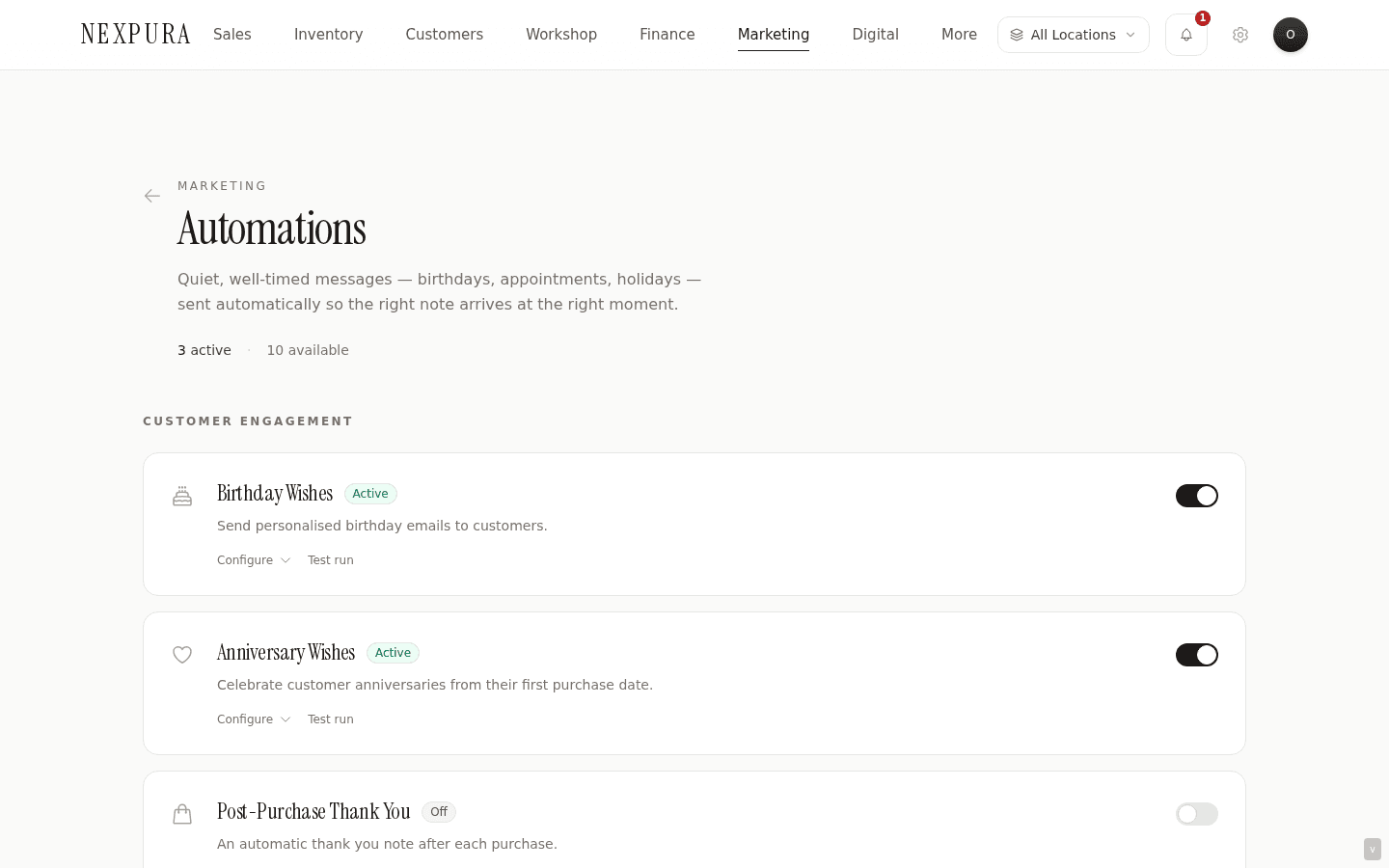
- The automations surface at /customers/automation lists every recognised per-event automation as a card with: a name, a one-line description, an Active / Off badge, a Configure toggle that reveals settings, a Test run affordance (where supported), and the underlying enabled toggle.
- Ten automation types recognised today: birthday, anniversary, repair_ready_reminder, reengagement, post_purchase, appointment_24h, appointment_1h, valentines, mothers_day, christmas. Each row persists to the marketing_automations table with the chosen template_id, settings object (lead-time, qualifiers), and enabled flag.
- Settings vary by type. Birthday and Anniversary carry a days_before offset (0 = on the day, 1 / 3 / 7 = days ahead) plus optional qualifiers (Birthday adds an include-discount-code toggle). Repair Ready carries a days_after offset (3 / 5 / 7 / 14 days post-ready). Re-engagement carries a months_inactive threshold (3 / 6 / 12 months) plus optional special offer. Post-purchase carries a request-review toggle. Appointment-reminders are fixed-window (24h or 1h before). Seasonal types are fixed to their month.
- Test run is a count-only dry preview supported for birthday and anniversary types. It returns “N customers would match today” without sending. Other types report “Test run not yet available” — the matcher logic for those depends on cross-table joins that ship alongside the runner.
- Permissions: toggling, settings changes, and template binding are owner / manager only (these actions configure customer-facing messaging at scale). The parallel customer-segment view at /customers/automation reads from the same marketing_automations rows — same toggles, different lens.
Walkthrough
1. Open the automations page
Go to /customers/automation (or via the Automations quick-action tile on the /marketing hub). The page renders the per-event cards stacked vertically; each card stands alone — toggling one doesn't affect any other.
2. Pick an automation to configure
Click Configure on any card to expand the settings panel. Birthday Wishes, for example, expands to show the days_before dropdown (On their birthday / 1 day before / 3 days before / 7 days before) and the include-discount-code toggle. Anniversary Wishes shows the same shape minus the discount toggle.
Re-engagement's settings carry the months-inactive dropdown (3 / 6 / 12 months) and the include-special-offer toggle. The repair-ready reminder carries the days-after-ready dropdown. Post-purchase carries the request-review toggle. Seasonal types and the appointment reminders have no per-tenant settings — they fire on their fixed schedule when enabled.
3. Bind a template
Each automation type expects a template binding — the message the runner will dispatch when the automation fires. The template picker inside the configure panel lists every template of the matching type (e.g. Birthday Wishes shows templates with template_type = birthday) plus any custom templates explicitly tagged for this automation type.
If no template binding is selected, the automation falls back to the canonical system template for that type. Selecting a custom template (often a duplicate of the system template with your store's tone and any special-offer wording) overrides the default. The template binding is by ID — editing the template later changes what the automation will dispatch when the runner fires, which is intentional; recurring intent should let operators refine the message without re-toggling.
4. Run the test-run dry preview (supported types)
On the Birthday and Anniversary cards, the Test run button returns the count of customers who would be matched today, given the currently-saved settings. The match logic: customers whose birthday or anniversary MM-DD matches today + the configured days_before offset. If you have days_before = 7, the test run returns customers whose birthday or anniversary falls exactly seven days from now.
The test run is count-only — no message goes out, no customer is touched, no Communications-tab row is created. It's the “how many would receive this if the runner fired right now?” diagnostic. Other automation types (repair-ready, re-engagement, post-purchase, appointment, seasonal) report “Test run not yet available” — the matcher logic for those depends on cross-table joins that land alongside the runner. The test-run affordance will populate for them when the runner ships.
5. Enable an automation
Flip the enabled toggle on the card to On. The Active badge replaces the Off badge, the toggle persists to marketing_automations.enabled = true, and the row is now in the “intended to fire” set. The hub's Automation flows KPI counts this row.
What the toggle being on does NOT yet do is fire the message automatically when matched customers cross the trigger threshold. See the honest disclosure section below for the current state of the execution layer and the manual workaround paths.
6. Cross-reference the customer-side view
The same marketing_automations rows surface in a parallel view at /customers/automation, presented per-segment instead of per-automation-type. A staff member thinking “how do I touch my VIPs more?” lands on /customers/automation naturally and sees the relevant toggles in segment context. A staff member thinking “does our birthday template look right before I turn it on?” lands here. Same persistence, two lenses; flipping a toggle in either surface is reflected on the other.
Honest disclosure
Two layers of the automation feature — the configuration layer and the execution layer — are at different maturity levels today. The honest split:
What's shipped today
The configuration layer is shipped in full. Every per-event automation has a card with the toggle, the settings (lead-time, qualifiers), the template picker, and the persisted binding to a row in the marketing_automations table. Toggling, settings changes, and template selection persist immediately via owner / manager permissions. The Test run affordance returns the count of birthday and anniversary customers who'd match today given the configured settings — a non-destructive dry preview, no message sent. The Automation flows KPI on the /marketing hub counts the enabled rows. The parallel customer-segment view at /customers/automation reads from the same rows.
What's in build
The execution layer — the cron runner that reads the marketing_automations rows on a schedule, matches customers against the configured trigger, picks the configured template, and dispatches the message. The toggle for “send anniversary email” exists; the runner that finds the matched customers on each day and actually fires the dispatch doesn't yet exist. The system-of-record reference is in the module that powers the test-run affordance — src/app/(app)/marketing/automations/actions.ts carries the comment “the configured cron runners that actually fire these automations don't exist yet (marketing_automations rows are configured but never read by any cron handler in src/app/api/cron). Until a runner lands, showing the matcher count is the most honest test run.”
This applies to every automation type — Birthday, Anniversary, Repair Ready, Re-engagement, Post-purchase, Appointment 24h / 1h, Valentine's, Mother's Day, Christmas. Toggling any of them on today persists the preference; no message dispatches in response without a manual action. Toggling them on captures your intent for when the runner lands; the interim posture is honest about the gap.
The same root cause holds scheduled-send on the campaigns surface (a campaign scheduled for a future time persists the schedule but doesn't auto-fire). Both ship together when the cron-runner layer lands.
Interim workaround paths
Each automation type has a manual equivalent that covers the same audience:
- Birthday and anniversary — the /reminders dashboard surfaces matched customers in a 30-day window; staff click through to the customer and send 1:1 via the customer detail page's email modal. Or run a campaign targeted at the Birthday this month segment for a batch send.
- Re-engagement — build a campaign targeted at the Inactive 90+ days segment and send manually.
- Repair-ready reminders — the customer-facing ready-for-collection notification already fires from the repair status-change path; the marketing re-prompt on uncollected repairs is the next-step nudge that the cron runner will fire. Manual equivalent: filter repairs by status = ready and collection-overdue, touch the customers from the list.
- Post-purchase — the receipt email already fires from the sale-completion path; the marketing post-purchase thank-you is the soft-touch follow-up. Manual equivalent: filter customers by recent sales and send a thank-you campaign.
- Appointment reminders — the appointment-detail page's reminder affordances exist for manual send; cron-driven 24h / 1h auto-fires are pending.
- Seasonal campaigns — these are fixed-window (Valentine's, Mother's Day, Christmas) and translate naturally to a one-time campaign send at the right time. The automation version is the “set once, forget” convenience; the manual version is identical work, just consciously-triggered.
The interim posture: configure the toggles today to capture intent — when the runner lands, every toggle that's on starts firing without operator intervention, and tenants who've set up don't need to revisit anything. Use the manual workarounds in the meantime so the touchpoint history stays complete on each customer's Communications tab.
Related diagnostic context lives on the problem-page at The forgotten anniversary — same root cause, written for a store owner evaluating Nexpura. Two adjacent docs pages also document this same gap from a different angle: anniversary and reminders (the date-capture and reminders-dashboard half of the workflow) and clienteling workflow (the high-value-customer outreach half). When the cron runner ships, all four surfaces flip to shipped together. Talk to us if these are load-bearing for your store.
Common questions
Why ship the configuration UI before the runner that actually fires the automations?
Two reasons that point the same direction. First, the configuration is the harder design problem. Deciding which automations exist, what their triggers should be, how the lead-time settings work, which templates plug in, and how operators think about turning them on or off — that's a UX surface that needs real-store-owner feedback to get right. Shipping the configuration early without the runner behind it lets us learn what the interface should look like from operators configuring alongside the /reminders dashboard and the manual campaign path. Second, capturing intent now means the runner can fire correctly from day one when it ships — every toggle that's on the moment the runner lands starts firing, and tenants who configured early don't need to re-do the setup. Operators who held off configuring because the runner wasn't live would be late to activate.
The cost is the gap documented above — the toggle being on today is a record of intent, not a guarantee of execution. That cost is real, and is why the honest disclosure leads with it.
Why is Test run supported on Birthday and Anniversary but not on Re-engagement, Repair Ready, or Post-purchase?
Birthday and Anniversary are date-column matches against a single customers-table column — the matcher logic is one query against customers.birthday or customers.anniversary. Cheap, fast, and the count is meaningful as a dry preview.
The other automation types require cross-table joins. Repair Ready needs to read workshop_jobs with status = ready, joined back to customers, with collection-overdue filtering. Re-engagement needs to read the customer's most-recent interaction across several tables (sales, repairs, communications) to compute the inactivity threshold accurately. Post-purchase needs to read sales rows joined to customers within a recency window. These matchers are non-trivial enough that we ship them alongside the runner — wiring them up just for Test run ahead of the runner would duplicate work and risk the dry-preview number diverging from what the runner eventually computes. Honest count or no count; not an approximation.
Why two automation surfaces — /customers/automation and /customers/automation?
Two different lenses on the same underlying marketing_automations rows. /customers/automation leads with the automation-type perspective — “here are the event-triggered automations Nexpura recognises, and here's the template each will dispatch when fired.” /customers/automation leads with the customer-segment perspective — “here are your segments (VIP, Inactive, Birthday, New) and here are the automations that target them.” Same toggles under both, same persistence; each surface is optimised for the operator question that brought them there.
A staff member thinking “how do I touch my VIPs more?” lands on /customers/automation naturally and sees the relevant toggles in the context of the segment. A staff member thinking “does our birthday template look right before I turn it on?” lands on /customers/automation and sees the template selection clearly. Both surfaces are honest about the execution-layer gap; whichever you land on, the picture of what fires today and what doesn't is the same.
Why are appointment reminders separate 24h and 1h automations instead of one with a configurable lead time?
Two different mental models. The 24h reminder is the “don't forget tomorrow” nudge — gentle, informational, useful for the customer to plan their day. The 1h reminder is the “you're about to be late” nudge — immediate, sometimes urgent, often paired with a contact-us-if-you-can't-make-it line. The two have different message shapes and tones; the templates that drive them are different in practice.
Collapsing them into one toggle with a lead-time picker would force one template to cover both tones — either too soft for the 1h send or too alarming for the 24h send. Keeping them separate lets stores configure each independently, with the right template per nudge, and turn one or both on as their customer base prefers.
Will the automation respect customer consent when it fires?
Yes. The runner will apply the channel-specific consent gate at dispatch time, the same way campaign sends do today — a customer who has opted out of marketing on the configured channel is skipped, and the skip is recorded so the automation's send stats reflect the intended-but-skipped count. Capturing intent today doesn't bypass the consent gate when the runner lands; the gate is a separate layer that fires regardless of whether the message originated from a campaign, a 1:1, or an automation.
The customer add / edit page has the consent fields; the customer detail page surfaces them in the Overview / Marketing-preferences section. Capturing consent accurately at intake is what keeps the eventual automation sends honest.
Troubleshooting
Automation is toggled on but customers aren't receiving the automated messages
Symptom: the toggle is on, customers definitely match the trigger (e.g. it's their birthday, or they've been inactive for 6+ months), but no message went out. Cause: expected today, documented in the honest disclosure section above. The cron runner that reads the marketing_automations table and dispatches messages doesn't yet exist; toggle state captures intent but doesn't guarantee execution. Fix:use the manual workaround paths in the honest disclosure section above — the right one depends on which automation. Birthday and anniversary go through /reminders or a Birthday-this-month campaign; re-engagement goes through the Inactive 90+ segment + a campaign; appointment reminders go through the appointment detail page's manual reminder send.
Test run returns 0 matches but I know I have birthdays coming up this month
Symptom: the Test run affordance on the Birthday Wishes automation returns “0 customers would match today” but the /reminders dashboard shows birthdays this month. Cause: the two surfaces use different windows. /reminders shows a 30-day forward window. The test-run match count uses the configured days_before offset from today specifically — defaults to 0, meaning “match customers whose birthday is exactly today.” On a Tuesday with no birthdays falling exactly on Tuesday, the count is correctly 0 even though there are upcoming birthdays this month. Fix: if you want the automation to fire the configured number of days before the birthday, set days_before in the automation settings to the lead time you want (e.g. 7 to fire one week before). The match count then reflects customers who match “today + 7 days.” This same troubleshooting entry exists on the anniversary and reminders page with the same fix.
Test run returns “Test run is not yet available for this automation type”
Symptom: the Test run button on Repair Ready, Re-engagement, Post-purchase, Appointment, or a seasonal type returns the unsupported message. Cause: expected. The matcher logic for these types requires cross-table joins (workshop_jobs for repair-ready, sales / interactions for re-engagement, appointments table for the appointment reminders). Wiring up matchers ahead of the runner would risk the dry-preview count diverging from what the runner eventually computes. Fix: no fix today — the test-run affordance for these types populates when the runner ships. Until then, the cohort estimation has to come from the corresponding manual surfaces (filter the workshop list by ready + overdue, run an Inactive 90+ segment count, filter the appointments calendar by the relevant window).
Template picker on an automation shows no templates for that type
Symptom:the configure panel's template picker shows an empty dropdown for the chosen automation type. Cause: the picker filters templates by template_type; if the only system template with that type was deleted (rare — system templates are locked) or the tenant hasn't duplicated one yet, the dropdown is empty. Fix: open /marketing, find the matching system template (e.g. Birthday Wishes for the birthday automation), click Duplicate, save. The duplicate now appears in the automation's template picker. The automation falls back to the system template if no binding is selected and a system template exists; the picker showing empty means even the system version isn't resolving — contact support if duplicate-then-select doesn't recover.
Toggling an automation on returns “Only owner or manager can ...”
Symptom: a toggle action returns the permission-denied message inline. Cause: automation toggles fire customer-facing messages on your tenant's behalf — they're gated to owner / manager. Salesperson, workshop, and accountant roles can read the configuration but not modify it. Fix: ask an owner or manager to flip the toggle, or to elevate your role if your responsibilities have changed. Roles are managed under settings.
Related
- Related: The problem this solves — “The forgotten anniversary” — the customer-facing framing of the same automation-execution gap
- Anniversary and reminders — the date-capture and reminders-dashboard half of the same gap, documented from the customers-and-clienteling angle
- Clienteling workflow — the high-value-customer outreach half of the same gap, with the manual workaround paths spelled out
- Marketing & automations overview — how automations compose alongside segments, templates, and campaigns
- Message templates — the subject + body scaffolds each automation dispatches
- Campaigns and bulk send — the manual workaround for automation work today (scheduled-send carries the same cron-runner gap)