Customer segments
Rule-driven cohorts of your customer book — system segments (VIP, New, Lapsed, Active repairs, High value) ship pre-built, custom segments are defined with a typed-rule qualifier and a name. Segment counts refresh on demand and on page load; segments feed the campaign builder and the automation runner when it ships.
Quick reference
- Segments live at /marketing and are split into two panels: Pre-built segments (the system cohorts every tenant gets) and Custom segments (the ones you define).
- Five system rule types: vip (top-N% by spend, configurable percentile), new (joined in the last N days), lapsed (no purchase in N+ months), repair (has active or past repairs — flag, no qualifier), and high_value (single purchase over $N). Each rule reads its data from the current customer book — cohorts are dynamic, not snapshots.
- Each segment card shows the cohort name, the rule description, the customer count, and a Refresh button that recomputes the count on demand. Clicking anywhere on a card except the Refresh button opens the campaign builder pre-targeted at that segment.
- The customer count refreshes automatically when the page loads and on demand via the per-card Refresh button. There's no background recompute on a schedule — the count you see was current at the most-recent refresh.
- Permissions: create / edit / delete on segments is owner / manager only — segments define who marketing sends to, so they're marketing-admin. Read of segment definitions and counts is broader.
Walkthrough
1. Open the segments page
Go to /marketing (also reachable from the More dropdown on the /marketing hub). The header carries the page title, a subtitle, and a New Segment primary CTA in the top right. Below the header, two panels: Pre-built Segments (system cohorts) and Custom Segments.
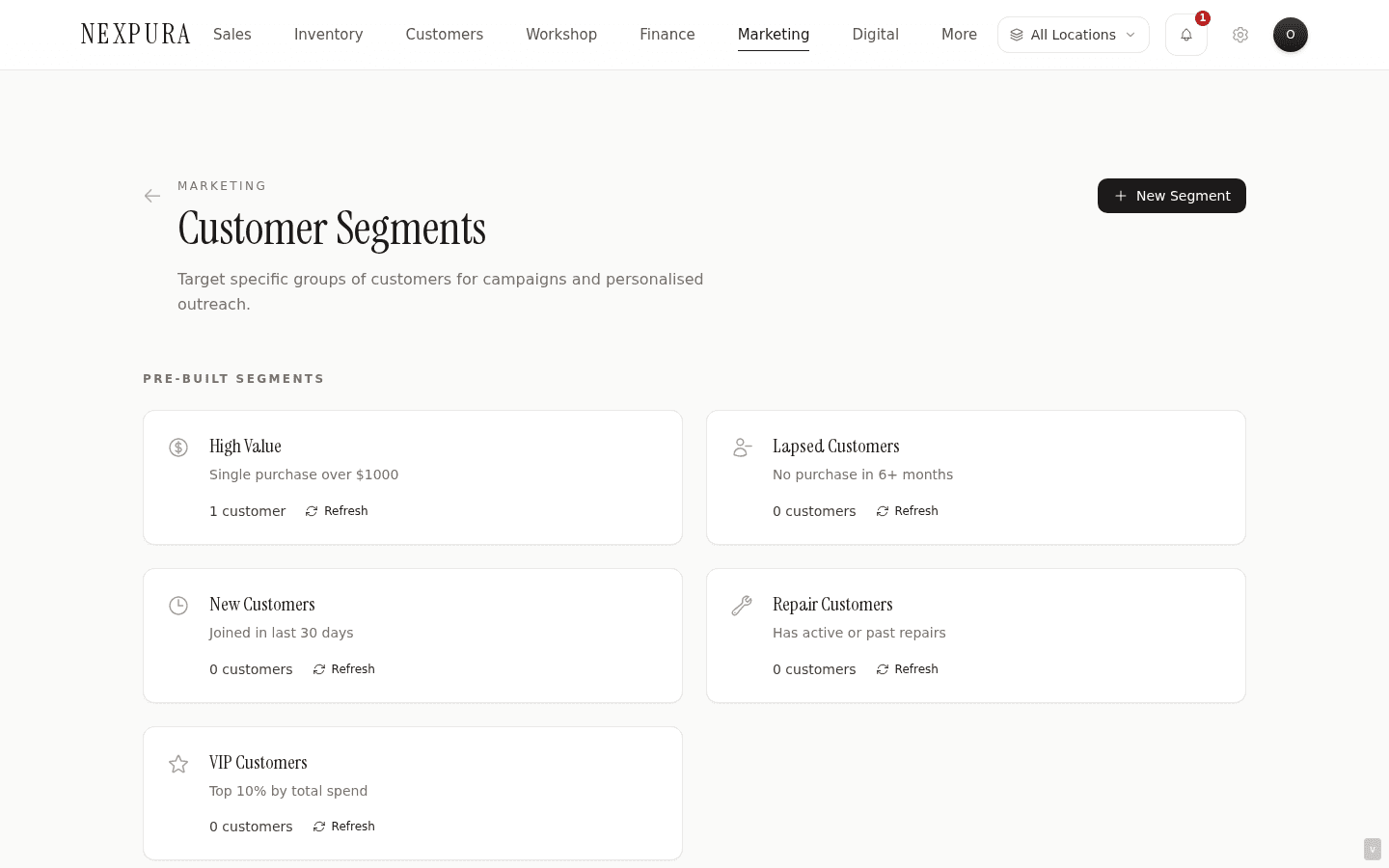
2. Read a system segment card
Each system card shows: an icon (segment type), the segment name, a one-line description of the rule (e.g. “Top 10% by total spend” for VIP, “Joined in last 30 days” for New, “No purchase in 6+ months” for Lapsed), the customer count, and a Refresh affordance. Click anywhere on the card except Refresh and you land on /marketing/campaigns/new?segment=<id> — the campaign builder with this segment pre-selected as the recipient cohort.
The segment data is dynamic. The card's count is the result of the rule applied against your customer book at the time of the most recent count refresh; the recipient list a campaign expands at send time is recomputed then, so the cohort matches the book's state at the moment of send, not the moment of campaign-row creation.
3. Refresh a segment count
The Refresh affordance on each card recomputes the customer count for that segment by re-running the rule against the current customer table. Use it when you've just imported or edited customers and want to see the cohort's new size before queueing a campaign. The button spins while it works; the row refreshes inline.
You don't need to hit Refresh before a send — send time recomputes the recipient list independently. Refresh is for the operator's answer to “how many customers are about to receive this if I send now?”
4. Create a custom segment
Click New Segment. The modal asks for: a name, an optional description, a rule type (the dropdown mirrors the system types — new, lapsed, high_value, vip, repair), and a rule value where the type requires one (days for new, months for lapsed, amount for high_value, percentile for vip; the repair type is a flag with no qualifier).
The rule-value field is required for the parameterised types. Submitting without a value (or with a non- positive value) returns an inline error rather than persisting a malformed segment — a known earlier-state bug where the default rule_type was “custom” and the saved rule matched no customers; the input validation closes that gap.
5. Use a segment in a campaign or automation
From the segments page, clicking a card opens the campaign builder with the segment pre-selected. The builder lets you pick a template (or write the body fresh), confirm the recipient count, optionally schedule the send, and dispatch. The send records to every matched customer's Communications tab so the touchpoint history stays complete.
On the automations side, segments aren't directly attached to per-event automations — automation matching uses date fields (birthday, anniversary), activity fields (last update for lapsed), or event fields (repair status for repair-ready). The segment cohorts and the automation cohorts overlap by definition: the Birthday this month segment and the Birthday automation match the same customers via the same column.
Common questions
Why are system segments dynamic instead of a fixed list I can edit?
The system cohorts (VIP, New, Lapsed, Active repairs, High value) describe shapes of customer relationship that every store cares about, and the rule for each is well-defined enough that store staff shouldn't be reinventing the definition. “Lapsed” reads the updated_at timestamp the same way every time; “VIP” reads the is_vip flag (or, for the top-N% rule type, the spend total). Editing the rule would let one tenant accidentally drift into a definition that no longer means the same thing as “VIP” elsewhere in the product — the hub KPI, the Mailchimp sync, the clienteling reports — and the cross-surface coherence would degrade.
If a store wants a finer-grained cohort (“Lapsed but only my watch customers”, “VIP plus repair active”), the custom segment surface is the right place — the system segments stay as the canonical baseline and the custom segments layer your own definitions on top without disturbing the canonical ones.
Why is the customer count not always identical between the segments page and the campaign builder after a send?
Two different snapshots. The segments-page count is the result of the rule at the most-recent Refresh (or page load). The campaign builder, at send time, recomputes the recipient list against the current customer book — which may have changed since the segments page last refreshed (new customers added, customers edited, soft- deletes applied, qualifying flags flipped). A slight delta is normal and reflects book activity between the two reads.
For the highest-fidelity number before sending, hit Refresh on the segment card, then open the campaign — the gap collapses to anything that changed in those few seconds, which is usually zero for normal store activity.
How do segments interact with the consent fields on customer records?
Segments don't filter on consent. A segment like “Lapsed” returns every customer the rule matches, regardless of marketing-consent status. The consent gate fires further down the pipeline — at send time, the dispatcher checks the channel-specific consent flag and skips non-consenting recipients. The campaign send result includes a count of recipients who were skipped because they didn't consent on the configured channel.
This split keeps segment counts as the “size of the cohort” question rather than “size of who's sendable.” The downstream consent gate is where marketing-send compliance lives — see the customers documentation for the consent fields and how to capture them at intake.
Can I segment by a custom tag I've been applying to customers?
Indirectly. Custom segments today use the typed rule types (new, lapsed, high_value, vip, repair); they don't yet expose a tag-equals-X rule. However, the campaign builder's recipient picker accepts a tag-based recipient type — pick Tags as the recipient type and select one or more tag strings, and the campaign dispatches to every customer carrying any of those tags.
The functional equivalent of “send to tag X” is therefore available without going through segments at all. If you want the tag-based cohort named and surfaced as a reusable segment with a count, let us know — tag-driven custom segments are a reasonable extension to the rule-type ladder.
What's the difference between the Mailchimp audience sync and a Nexpura segment with a campaign?
Different tools for different shapes of outreach. The Mailchimp integration (covered under Mailchimp integration) flows every marketing-consented customer into your Mailchimp audience as a subscribed member, so you can run sophisticated Mailchimp campaigns (segmentation, automation, A/B testing) in that tool. Nexpura segments + campaigns are the path for outbound that runs inside Nexpura — one-click, recipient picker, send, recorded on the customer's Communications tab.
Stores using both: the Nexpura path is for short- cycle, in-context, jewellery-specific outreach (private viewing invite, anniversary touch, repair-ready follow-up). Mailchimp is for longer- cycle, broader-funnel work where Mailchimp's own segmentation surface is the fit. The two don't collide — same source of truth (Nexpura customers), different downstream dispatch.
Troubleshooting
A system segment count reads 0 but I know I have customers in that cohort
Symptom: a system segment card (e.g. VIP) shows 0 customers even though the customer list filtered to VIP shows several rows. Cause:the segment count is computed from the rule's persisted column (e.g. is_vip for VIP); if customers were tagged VIP via a path that set the tags array but not the column (CSV import, direct DB write, legacy data), the badge renders from the array but the count misses them. Fix: the clienteling workflow page documents this in detail — re-save each customer through the edit form to sync the column, or contact support for a one-line update across the tenant.
Custom segment save returns “Choose a valid segment type” or “Enter a positive value”
Symptom: the New Segment modal returns an inline error on submit. Cause: the server validates the rule shape — the rule must carry a recognised type, and the type- specific qualifier (days / months / amount / percentile) must be a positive number where required. Submitting without selecting a type, or leaving the rule-value field empty for new / lapsed / high_value / vip, trips the guard. Fix:pick a valid rule type, enter a positive numeric value in the qualifier field, save. The repair type is the exception — it's a flag and accepts an empty value.
Refresh button spins indefinitely or fails silently
Symptom: the Refresh affordance on a segment card stays in the spinning state or returns the page to the previous count without an obvious update. Cause: the count action runs the rule against the customer table; on a tenant with tens of thousands of customers, the query can take several seconds. A network blip mid-query returns the page to its previous state without surfacing an inline error. Fix: reload the page (the count refreshes on load). If the refresh fails repeatedly on the same segment, contact support — there's an index on the matching column we can verify is in place for your tenant.
Delete on a custom segment returns “Cannot delete a segment in use by a campaign”
Symptom: the Delete affordance on a custom segment card returns a guard message. Cause:the segment is referenced by at least one campaign row (draft, scheduled, or sent). Deleting it would orphan the campaign's recipient filter. Fix:open the campaigns page, find every campaign with this segment as the recipient (use the recipient filter on the list), delete or edit those campaigns first, then return to the segments page and delete the segment. Sent campaigns retain a frozen recipient list — the segment binding is the row reference, not a snapshot of who matched — so deletion of a referenced segment would break the sent campaign's historical accuracy.
Card-click opens the campaign builder but the segment isn't pre-selected in the recipient picker
Symptom: clicking a segment card opens the campaign builder, but the recipient picker shows the default (all customers) rather than the segment you clicked from. Cause: the card links to /marketing/campaigns/new?segment=<id> — the builder reads the segment query parameter and pre-selects on mount. If the parameter is dropped (some browser extensions strip URL params; very rare), the pre-selection doesn't fire. Fix: manually pick the segment from the recipient picker dropdown — the cohort is the same, just one click vs zero. If the issue is reproducible and consistent, the URL parameter is being stripped in transit; check browser extensions or network middleware.
Related
- Marketing & automations overview — how segments compose with templates, campaigns, and automations
- Campaigns and bulk send — sending a segment a one-time message
- Marketing automations — the event-driven cohort matchers (configuration ships, runner being built)
- Clienteling workflow — using segments alongside 1:1 outreach for high-value-customer touch cadences
- Mailchimp integration — flowing consenting customers into a Mailchimp audience for that-tool segmentation