Campaigns and bulk send
One-time outbound to a segment, a tag set, or a manual recipient list — the campaign builder, the inline bulk-email and SMS-campaign surfaces, and the recipient picker that's shared between them. Manual send-now works end-to-end; scheduling a campaign for a future time persists the schedule but the runner that fires scheduled sends at the configured time is being built next.
Quick reference
- Three working surfaces for one-time outbound: /marketing/campaigns (full campaign builder — persisted rows, optional schedule, template selection), /marketing/bulk-email (inline one-shot send — no saved campaign row), and /marketing/sms-campaigns (the messaging-channel equivalent).
- Recipient picker is consistent across all three: recipient type is one of all, segment, tags, or manual; the picker reveals the matching qualifier (segment dropdown, tag chip-multi-select, or customer-search-and-select for manual). Recipients without the channel-relevant field (no email for an email campaign, no phone for SMS) are filtered out at send time.
- Campaigns have four statuses: draft (saved, not sent), scheduled (persisted with a future scheduled_at), sending (a send is in progress — a concurrency claim that prevents a parallel double-blast), and sent (delivered with stats recorded).
- Send-now works end-to-end: recipient list expands, messages dispatch in batch, every recipient gets a row recorded on their customer detail page's Communications tab, stats (sent / failed) persist to the campaign row.
- Permissions: campaign create / edit / send / schedule / delete is owner / manager only — salesperson, workshop, accountant roles are blocked from the destructive paths.
Walkthrough
1. Pick the right surface for the work
For a saved, named campaign you might re-run or reference later — use /marketing/campaigns. For a one-off send you don't need to keep around — use /marketing/bulk-email (or /marketing/sms-campaigns for SMS). Both honour the same recipient picker and record to each customer's Communications tab the same way; the difference is the persisted campaign row.
The hub's Email outreach and SMS outreach quick-action tiles deep-link to bulk-email and SMS campaigns respectively (the legacy bulk-SMS address redirects to SMS campaigns). Create campaign deep-links to the campaign builder.
2. Create a new campaign
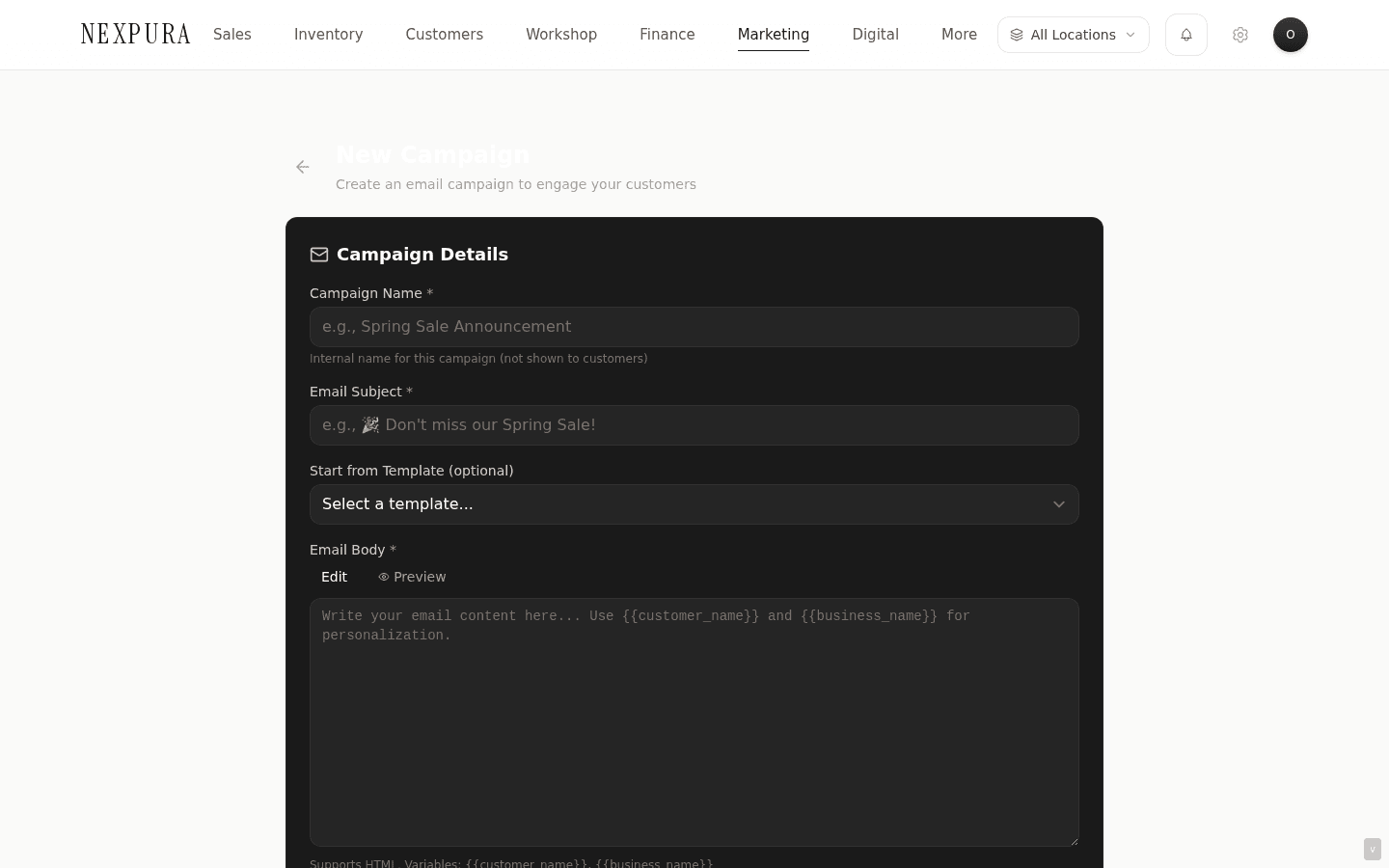
From /marketing/campaigns click New Campaign — or from the hub click the Create campaign tile. The builder asks for: a name (internal, visible only on the campaigns list), a subject line, a body (or a template — the Template picker dropdown pre-fills subject + body, you can edit either after selection), a recipient type + filter (segment / tags / manual / all), and an optional schedule time.
3. Pick recipients
The recipient picker is the most consequential part of the form. Four types:
- all — every customer with a deliverable address on the channel; the count surfaces before you commit.
- segment — pick one of your defined segments (system or custom); the segment's current customer count is the upper bound on recipients.
- tags — multi-select one or more tag strings; recipients are customers carrying any of the selected tags (union, not intersection).
- manual — search and pick customers individually; useful for small targeted sends like “send these five collectors a private viewing invite.”
The picker shows a recipient count alongside the selection so you have a clear “this will go to N customers” before clicking send. The count is recomputed at send time against the current customer book, so a small drift between picker-time count and send-time count is normal.
4. Save as draft, send now, or schedule
Three terminal actions:
- Save as draft — the campaign persists with status: draft and a null scheduled_at. Edit it later from the campaigns list.
- Send now — the dispatch path. The campaign row claims status: sending (preventing a parallel double-blast), the recipient list expands, messages dispatch in batch, and on completion the row flips to status: sent with the sent_at timestamp and the recipient stats.
- Schedule — set a future scheduled_at timestamp and save. The campaign persists with status: scheduled. (See the honest disclosure section below for the current state of the scheduled-send runner.)
5. Bulk-email and SMS-campaign one-shot sends
For a one-off send with no campaign-row overhead:
Go to /marketing/bulk-email (or /marketing/sms-campaigns for SMS). The form mirrors the campaign builder's subject + body + recipient picker but skips the name field and the schedule option — the send is inline and immediate. Each dispatch still records to every recipient's Communications tab the same way a campaign does, so the touchpoint history stays complete.
The old address /marketing/bulk-sms redirects to SMS campaigns. Nexpura doesn't send WhatsApp campaigns.
6. Read the send result and the Communications-tab records
On a successful send, the campaign detail page shows the stats: sent count (recipients the provider accepted), failed count (recipients the provider rejected — usually invalid addresses, bounced addresses, or consent gates). Open / clicked stats populate over the following hours as the provider returns engagement events.
Per-customer, open the customer detail page and view the Communications tab. Each recipient of the campaign has a row labelled with the campaign name, the subject, the timestamp, and the provider status — so a staff member preparing for a follow-up call knows exactly what message that customer received when.
Honest disclosure
Two send paths — the immediate send-now and the scheduled send — are at different maturity levels. The honest split:
What's shipped today
The full campaign builder ships in production. Create a campaign with name + subject + body (or template), pick recipients (all / segment / tags / manual), and click Send now — the dispatcher claims the campaign (concurrent-send guard), expands the recipient list against the current customer book, sends the batch via the configured provider, records every recipient to their Communications tab, persists the campaign stats, and flips the row to sent. Failure on any step reverts the campaign to draft so the operator can retry without a stuck row. The same flow runs from /marketing/bulk-email for one-shot sends without a saved campaign row, and from /marketing/sms-campaigns for the messaging channel.
Save-as-draft ships — drafts persist and you can edit / send them later. Schedule-time persistence ships — setting a future scheduled_at saves the row with status: scheduled reliably.
What's in build
The runner that reads scheduled campaigns and dispatches them at the configured time. A campaign persisted with scheduled_at = tomorrow 10:00am sits in status: scheduled reliably, but no cron handler reads those rows and fires Send-now when the time arrives. The campaign waits in scheduled until someone manually clicks Send now, regardless of how far the scheduled time is in the past.
The same gap underlies the automation execution loop (per-event recurring intent) — both schedules and automation toggles persist the “when this condition is met, fire this message” intent reliably, but the cron-runner layer that reads those conditions and fires the dispatches isn't yet wired up. The root cause and the system-of-record reference live in the automations module — src/app/(app)/marketing/automations/actions.ts carries the comment “the configured cron runners that actually fire these automations don't exist yet.” Same family.
The interim posture for scheduled campaigns: use schedule as a planning tool — “set the campaign up tonight so I don't forget” — and then send-now manually at the planned time. Calendar reminder, open the campaign, click Send now. The extra click costs a moment of attention; the campaign content and recipient list are ready to go.
Related diagnostic context lives on the problem-page at The forgotten anniversary — same root cause, written for a store owner evaluating Nexpura. Talk to us if these are load-bearing for your store.
Common questions
Why ship schedule-time persistence before the runner that fires scheduled sends?
Two reasons that point the same direction. First, the operator workflow shape. Even without the runner, persisting a scheduled time is useful as a planning marker — “this campaign is ready, I've set it for tomorrow at 10am” — and the operator can rely on the schedule metadata when they come back to send. Stripping the schedule field entirely until the runner ships would force operators to track the planned time on a sticky note instead. Second, capturing intent now means when the runner lands, every scheduled campaign already on the table starts firing at its configured time without needing anyone to re-enter the schedule.
The cost is the gap documented above — until the runner ships, schedule is a planning marker, not an unattended dispatch. That cost is real, which is why the honest disclosure leads with it.
Why two send paths — /marketing/campaigns with a saved row, and /marketing/bulk-email without?
Two different operator intents. The campaign path is for sends you want to reference later — the campaigns list shows every campaign with its stats, the audit log records the send, the row gives you something to point at when answering “what did we send last month?” The bulk-email path is for one-off sends where the campaign-row overhead is friction — a quick announcement, an ad-hoc test, an unstructured outreach to a small group.
Both surfaces honour the same recipient picker and record to each customer's Communications tab the same way, so the per-customer touchpoint history stays complete regardless of which path you used. The only difference is the persisted row at the tenant level.
What happens if the send fails partway through — do the first half get the message twice when I retry?
The concurrent-send guard prevents that case. A Send-now claim flips the campaign to status: sending before any dispatch; while in sending, a parallel send is blocked at the row level. If the dispatch fails mid-batch, the catch block reverts the status to draft — but the recipients who already received the message are recorded on their Communications tabs.
On retry, the operator can either accept the recipients who already received the message and repeat the campaign (effectively double-touching them), or use the recipients-already-touched data on the Communications tabs to define a smaller custom segment for the retry that excludes them. Practically, most marketing-batch failures hit recipient-validation issues rather than the middle of the dispatch loop, so the partial-state recovery is rare.
Channel — does the campaign builder pick between email and SMS automatically, or do I commit to one upfront?
Commit upfront. The campaign builder at /marketing/campaigns is the email channel; the SMS-campaigns surface at /marketing/sms-campaigns is the SMS channel. The recipient picker is the same on both, but the channel-specific configuration (subject vs. message body shape, opt-in / consent gate, template content) differs enough that the surfaces are kept distinct.
For most outreach where channel is genuinely fungible, run the same campaign content through both surfaces — same segment, same message, dispatched through both — so customers receive the message on the channel they're reachable on. The Communications tab on each customer consolidates the touchpoint regardless of which channel delivered it.
When can I trust scheduled-send to fire on time?
Today: not at all. The scheduled-send runner is part of the same cron-runner layer that the automation execution loop depends on; both ship together. Until then, treat the schedule field as a planning marker and Send-now manually at the planned time. We'll update this page and the problem-page diagnosis when the runner lands; the last_verified date in the page frontmatter will move forward and the honest disclosure block will shift to past-tense.
If scheduled-send (or automation execution) is load-bearing for your store right now and the manual workaround doesn't fit your workflow, let us know — the cron-runner work is actively being scoped and tenant-pain feedback is the input that raises priority.
Troubleshooting
Scheduled campaign sits in scheduled past its configured time without sending
Symptom: a campaign you scheduled for an earlier time still shows status: scheduled; no “sent” row appears, no recipients received the message. Cause: expected today, documented in the honest disclosure section above. The runner that reads scheduled campaigns and dispatches them at the configured time isn't wired up yet. Fix:open the campaign and click Send now. The campaign dispatches immediately. Until the runner ships, schedule-then-walk-away isn't reliable — schedule-then-send-manually-at-the-planned-time is.
Send-now returns “No recipients found for this campaign”
Symptom: the Send now action returns the error and reverts the campaign to draft. Cause:the recipient picker's filter expanded to zero customers at send time. Several candidates: (1) the chosen segment's count was non-zero at picker time but the underlying customers no longer match the rule (e.g. Inactive 90+ days, and the customers were touched in between); (2) the chosen tags no longer match any customers; (3) the channel-specific filter (email present, phone present) removed everyone. Fix: open the campaign, re-confirm the recipient selection, maybe widen the cohort (different segment or broader tags). Hit Refresh on the segment card if you suspect the count drifted; pick a different segment if the original is now empty.
Campaign is stuck in sending status and won't let me retry
Symptom: a Send-now attempt failed (timeout, browser closed mid-send, network blip) and the campaign row is now in status: sending with no clear way to recover. Cause: the concurrent-send guard prevented the stuck state from double-blasting the list, but the catch-block revert to draft didn't fire (rare — usually because the page closed before the revert path executed). Fix: contact support with the campaign ID. We can read the audit log to confirm whether any send actually went out, and reset the row to draft (if no send) or sent with the recorded recipient set (if a partial send completed). The Communications-tab rows on affected customers are the source of truth for who actually received the message.
Edit on a sent campaign returns “Cannot edit a sent or sending campaign”
Symptom: the Edit affordance on a campaign card returns the guard message. Cause: the campaign has already been sent (or is currently sending). The row is locked because the historical accuracy of the recipient list, subject, and body would otherwise be lost — a sent campaign needs to read as the campaign that actually went out, not as a later edit. Fix: create a new campaign — Duplicate from the campaign list copies the recipient filter, subject, body, and template binding into a fresh draft you can edit and send. The original sent campaign keeps its historical record intact.
Stats show a high failed count after a campaign send
Symptom: the campaign sent successfully but the stats panel shows a meaningful percentage of failed recipients. Cause: several candidates. (1) Invalid or stale email addresses on the recipient list (rolled-up accumulation of typos, abandoned addresses, and consent-revoked recipients). (2) Provider rate-limiting on large sends — some providers cap concurrent dispatches. (3) Channel-specific bounce flags on the recipient's provider. Fix: expect a small failed count on every send. If the count is meaningfully high (over 5% of recipients), check the recipient list for stale addresses and consider a cleanup pass — the customer detail pages on the failed recipients will show the bounce-flag status. For rate-limiting, batch the send across smaller segments rather than one large one.
Related
- Related: The problem this solves — “The forgotten anniversary” — the customer-facing framing of the same cron-runner gap that holds scheduled-send and automation execution
- Marketing & automations overview — how campaigns fit alongside segments, templates, and automations
- Customer segments — defining the recipient cohorts the campaign builder targets
- Message templates — the subject + body scaffolds the campaign builder pulls from
- Marketing automations — recurring per-event intent (configuration ships, runner being built — same root cause as scheduled-send)