Task templates
A tenant-scoped library of named task shapes — title, department, priority, description — that owners and managers maintain at /settings/task-templates. Each template captures the four fields you'd set on a new task; today the library is a reference list rather than an apply-with-one-click mechanism on the new-task form, so the in-use workflow is copy-paste from the templates page into the create-task form. Per-tenant scope, not per-location.
Quick reference
- Task templates live at /settings/task-templates. Each template stores four fields: title (required), department (Workshop / Retail / Sales / Admin / Design or None), priority (Low / Medium / High / Urgent), and a multi-line description.
- Templates are tenant-scoped — every location of the same tenant shares the same template library. They're not location-scoped, not per-user, not per-role. Edit any template once and every staff member on the tenant sees the change.
- Create / edit / delete are owner / manager only. Salesperson, workshop, and accountant roles can view the library at /settings/task-templates but can't mutate it — the +New Template button and the per-row Edit / Delete affordances reject the action on save with a permission toast.
- Today templates are a curated reference list, not an apply-with-one-click affordance on the new-task form. To use a template in practice: open the templates page in one tab, the new-task form (/tasks/new) in another, copy the title / description / priority across, and add the per-task fields (assignee, due date, link-to) that aren't stored on the template. The honest disclosure section below covers the wire-up gap and what's in build.
- The template store doesn't carry a checklist / sub-task list, doesn't carry default attachments, and doesn't variable-interpolate (no {customer_name}-style placeholders). Title and description are stored verbatim and applied verbatim.
Walkthrough
1. Open the templates page
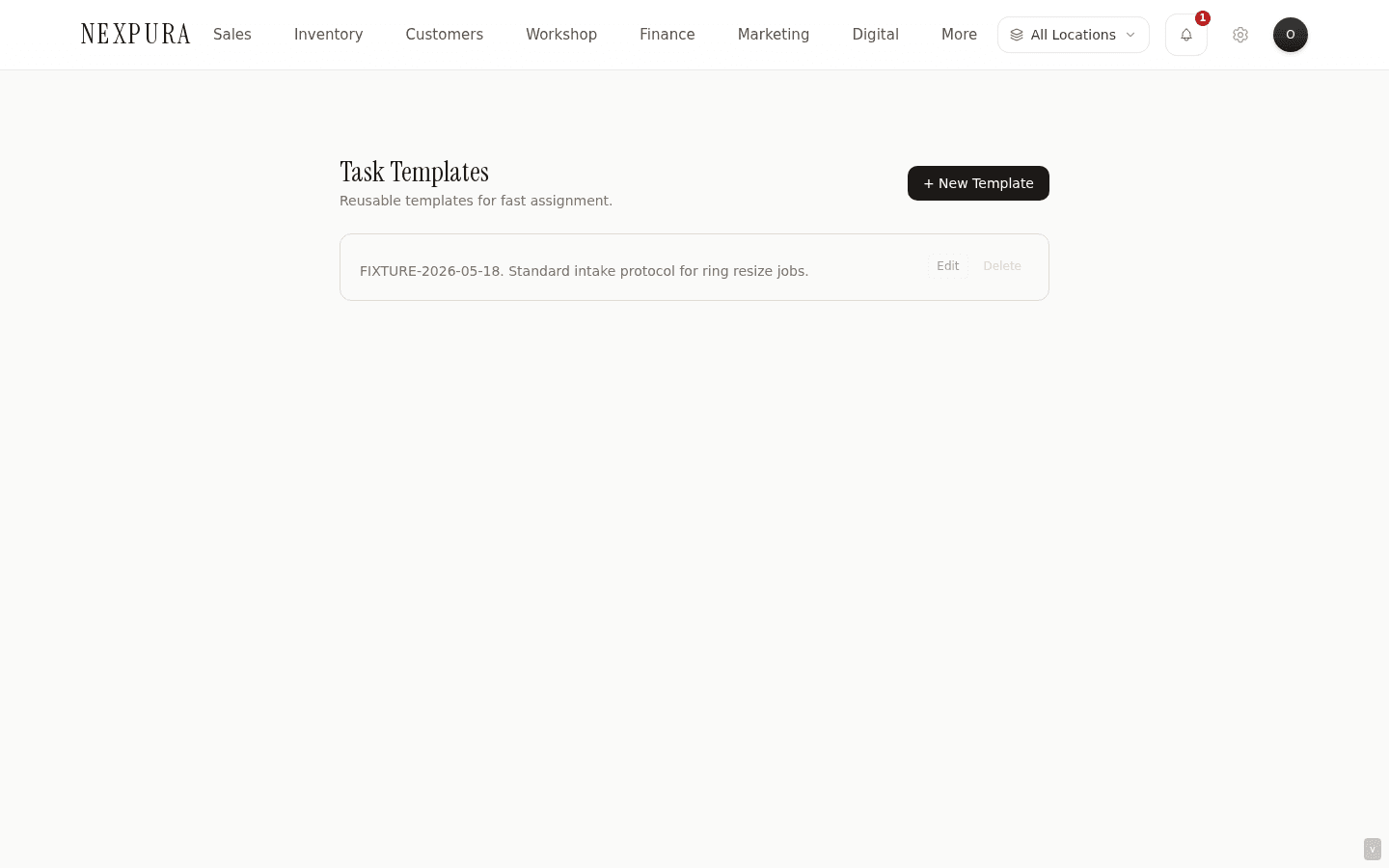
Go to /settings/task-templates. The page renders the current library as a vertical list of template cards, each with the template title, a small department chip, a priority chip, and the first line or two of the description. A + New Template button sits in the top-right.
2. Create a template
Click + New Template. An inline form opens above the template list with four inputs: a Title field (required), a Department dropdown (None / Workshop / Retail / Sales / Admin / Design), a Priority dropdown (Low / Medium / High / Urgent), and a Description textarea. Fill them in for the recurring task shape you want to capture — e.g. a “Ring polishing & final QC” template with Workshop / High / multi-line instructions for the bench. Click Create Template.
The new template lands at the top of the list. A confirmation message reads “Template created” for a couple of seconds. Below- manager attempts (which the UI doesn't pre- gate) fail with the toast “Only owner or manager can create task templates.”
3. Edit a template
Click Edit on any template card. The card switches to an inline edit form with the four fields populated from the current values. Adjust and click Save Changes. The card flips back to read mode with the new values. Below- manager attempts hit the same role gate as create.
Editing a template doesn't propagate to any tasks that were previously created from it — because templates aren't referenced by tasks after copy-out. A template change applies only to subsequent task creations that copy the new values. See the in-context section below for the bigger picture on template-to-task linkage.
4. Delete a template
Click Delete on any template card. The browser confirm dialog asks for confirmation; on OK, the template row is removed from task_templates. Same role gate as create and edit — below-manager attempts fail with the permission toast.
Because tasks don't reference templates after creation, deleting a template doesn't orphan any task data — it just removes that shape from the future template-picker. Restore is a manual step (re-create from the values you remember / documented elsewhere).
5. Use a template (today's workflow)
Today the templates page is a reference library; there's no “Use template” button on a template card and no template-picker on the new-task form. The in-practice workflow:
- Open /settings/task-templates in one tab and read the template you want.
- Open /tasks/new in another tab.
- Copy the template title into the new-task Title field; the template description into Description; set the new-task Priority to match the template's priority.
- Add the per-task fields the template doesn't store: the Assignee, Due Date, and the Link-to (Repair / Bespoke / Inventory / Supplier) if applicable.
- Click Create Task.
This is the manual shape until the apply-with-one- click affordance lands — see the honest disclosure section. For tenants with three or four templates used regularly, this is a 30-second workflow per task. For tenants with twenty templates used across a busy bench, the copy-paste friction is real and we hear about it; the wire-up fix is the next template-related ship.
Honest disclosure
Two halves of the task-template feature — the library half and the apply-on-create half — are at different maturity levels today. The honest split:
What's shipped today
The template library itself. The full create / edit / delete CRUD on /settings/task-templates is shipped, with the four-field schema (title, department, priority, description), the owner / manager role gate, and the per-tenant scoping. The data lives in the task_templates table, persisted reliably, and visible to every staff member on the tenant for reference. Templates can be edited any time without affecting tasks already created from them.
What's in build
The connect-the-library-to-the-form half. Today neither the new-task form at /tasks/new nor the inline new-task form on the /tasks page reads from the task_templates table — there's no template-picker dropdown, no “Apply template” button, no autocomplete on the Title field that surfaces matching templates. The UI workflow is open-templates-tab → copy → paste into create-form. The data model supports the wire-up cleanly (the template fields map one-to-one onto the task fields), so this is a UI-layer build, not a schema rebuild.
Two further shapes have come up in customer conversations as natural next-steps but aren't on the immediate build: (a) a checklist mini-language on templates that creates several tasks from one template (today a template makes one task), and (b) variable interpolation in the description ({customer_name}, {repair_due}) that resolves at apply-time. Those are conditional on the wire-up shipping first.
If the copy-paste workflow is meaningfully slowing your team down — particularly on benches with high template-usage cadence — talk to us. The wire-up priority shifts with the count of tenants on whom it's real friction. Talk to us if these are load-bearing for your store.
Common questions
Why ship the library before the apply-on-create hook?
Two reasons that point the same direction. First, the library is the harder cognitive shape to get right. What templates do you have? Who maintains them? Are they per-department or cross-tenant? Should “Ring polishing” and “Final QC” be two templates or one with a checklist? Those are decisions tenants need to make by curating real templates against real recurring work; shipping the library lets that curation happen now, alongside the in-app manual copy-paste workflow. By the time the apply-on-create hook ships, every tenant who uses the surface will have a library that's already battle-tested against their workflow. Second, the wire-up is constraint-shaped — template-picker dropdown, autocomplete, the cross-tab UX from /settings/task-templates to /tasks/new — and that's a UI-layer build that benefits from real usage feedback before the surface freezes.
The cost is the copy-paste friction documented above. We're paying that cost today deliberately so the apply-on-create shape lands against real curated libraries rather than the clean-slate test data we'd be shipping against if both halves shipped together.
Why are templates per-tenant rather than per-location?
Two reasons that point the same direction. First, recurring task shapes — “Ring polishing & QC”, “Quote follow-up at 30 days”, “Supplier call: spec confirmation” — are fundamentally workshop-or-counter-workflow shapes, not location-shaped. A tenant with two locations almost always wants the same template available at both; per-location templates would mean curating the library twice with no meaningful difference. Second, the alternative (per-location templates) would create consistency drift — “Final QC” shaped slightly differently at each location means audit-readers comparing the workshop workflows across stores see noise where the underlying task is the same. Per-tenant scope keeps the workflow shape consistent across the chain.
The trade-off is that a multi-location tenant with one location running a different workflow (e.g. a smaller store that doesn't have a bench and doesn't need workshop templates cluttering the list) currently sees the full library. The lighter shape — per-location filtering on a per-tenant template library, or per-template “applicable at locations X” metadata — would address that and is on the queue for after the apply-on-create wire-up.
Why department + priority but not assignee on the template?
Two reasons that point the same direction. Department and priority are workflow attributes — they describe the kind of work and how urgent it is, both of which stay consistent across instances of the same task. Assignee, by contrast, is a per-instance attribute — Sarah polishes the ring this week, Tom does it next week. Storing assignee on the template would push the template toward specific staff rather than the workflow, which is the wrong shape (templates outlive specific team-member tenure). Second, the cross-assignee gate documented on the Tasks overview page means an assignee-on-template would quickly hit role-gate friction — a salesperson applying a template that has “assigned to Sarah (manager)” embedded couldn't save the task without owner / manager elevation.
Due date is similar — per-instance, not per-template. The template shape stops at the fields that genuinely repeat across instances. The per-instance fields stay on the new-task form and get filled in for each task.
Does editing a template change tasks already created from it?
No. Tasks don't store a reference back to the template they were created from — the template fields are copied verbatim into the task at creation time, and the link is gone afterward. So editing a template tomorrow only affects the next tasks copy-pasted from it; every task already in flight keeps the title / description / priority it had at creation.
The shape is deliberate. Tasks once-created tend to carry their own evolution (comments, status changes, attachments) that diverges from the template they started as; back- propagating template edits would change the fixed text of an in-flight task in ways the assignee wasn't expecting. Copy-once- detach is the cleaner shape; it also means templates can be edited freely without worry about breaking active work.
Are task templates different from the message templates under Marketing & Automations?
Yes, completely. The marketing message templates at /marketing are customer-facing message shapes — birthday greetings, post-purchase thanks, service reminders — that fire as outbound communications to customers via the tenant's configured channel. Task templates at /settings/task-templates are internal-staff task shapes for the to-do board. Different surfaces, different audiences, different tables. The marketing templates do variable interpolation ({customer_name} etc.) because the message needs to address a specific customer; task templates don't, because the task title typically describes the work generically and the per-task customer link is the linked record field on the new-task form.
Troubleshooting
I can't find a template-picker on the new-task form
Symptom: you open /tasks/new expecting a Template dropdown or an “Apply template” affordance, and there isn't one. Cause: expected today, documented in the honest disclosure section above. Templates are a reference library; the apply-on-create wire-up isn't shipped. Fix: open /settings/task-templates in another tab and copy the title / description / priority across manually. If you find yourself copying the same template fifteen times a day, ping support — that's the kind of usage signal that bumps the wire-up priority.
“Only owner or manager can create task templates” toast on save
Symptom: you fill in the +New Template form, click Create Template, and the save fails with the permission-denied toast. Cause: your role on this tenant is below manager (salesperson, workshop-only, accountant) and template creation is owner / manager only. The same gate applies to edit and delete. The UI doesn't pre-disable the +New Template button for non-managers — the role check is server-side on the action. Fix: ask an owner or manager to create the template for you. If you need the role itself elevated, that's an owner action on /settings/team. See the role matrix on the team and roles page.
Edited a template and the change didn't show on a task I created from it last week
Symptom: you updated a template's description; the task you created from it earlier still shows the old description. Cause: expected. Templates are copied verbatim into tasks at creation time; there's no live reference back to the template from the task. Editing the template affects subsequent copy-pastes only. Fix: update the task directly via Edit task on its detail page if the change is meaningful to the in-flight work, or accept that the historical task carries the historical wording — for audit purposes this is usually the right shape (tasks should reflect what was decided when they were raised, not retroactively-edited template text).
Template I created on one location doesn't show on the other location
Symptom: you set up a template at one location of a multi-location tenant; a staff member at the other location reports they don't see it. Cause: this shouldn't happen — templates are tenant-scoped, not location-scoped, and every staff member on the tenant reads from the same library regardless of which location they're signed in at. The most likely real cause is that the staff member is looking at the page under a different tenant (a multi-tenant test account, or a stale session pointing at the wrong tenant_id), or the template-list page is showing a cached prior load. Fix: have the colleague hard-refresh /settings/task-templates (Cmd+Shift+R) to bust any cached payload. If the template still doesn't show, confirm they're signed in to the same tenant (the tenant name shows in the page header) and that their team membership is active. If it still doesn't show, ping support with both staff IDs and the template title — there may be a tenant-ID mismatch on one of the accounts.
Template list comes up empty even though I know there are templates
Symptom: /settings/task-templates renders “No templates yet. Create your first one to speed up task assignment.” — but you're sure you have templates. Cause: two candidates. (1) The list-load query errored on a transient network issue; the empty state is shown by default while loading and stays if the load fails silently. (2) The templates were created against a different tenant — multi-tenant accounts show different libraries depending on which tenant the session is bound to. Fix: reload the page; on a second-attempt load the query usually succeeds. If the list stays empty, check the tenant name in the page header against where the templates were originally created. If you have only one tenant and the templates still aren't loading, contact support — a real schema-cache stale-read is rare but possible; the symptom-shape matches.
Related
- Tasks overview — the surface templates feed into, with the new-task form fields the template doesn't store (assignee, due date, link-to)
- Comments and attachments — what happens after a task is created; templates don't carry pre-attached files or seed comments
- Message templates — the customer-facing message template library, easily confused with task templates but a different surface entirely
- Repair pipeline — the upstream that benefits most from recurring task templates (stage-by-stage workshop tasks)
- Team and roles — the role matrix that controls who can create / edit / delete templates (owner / manager only)