Tasks overview
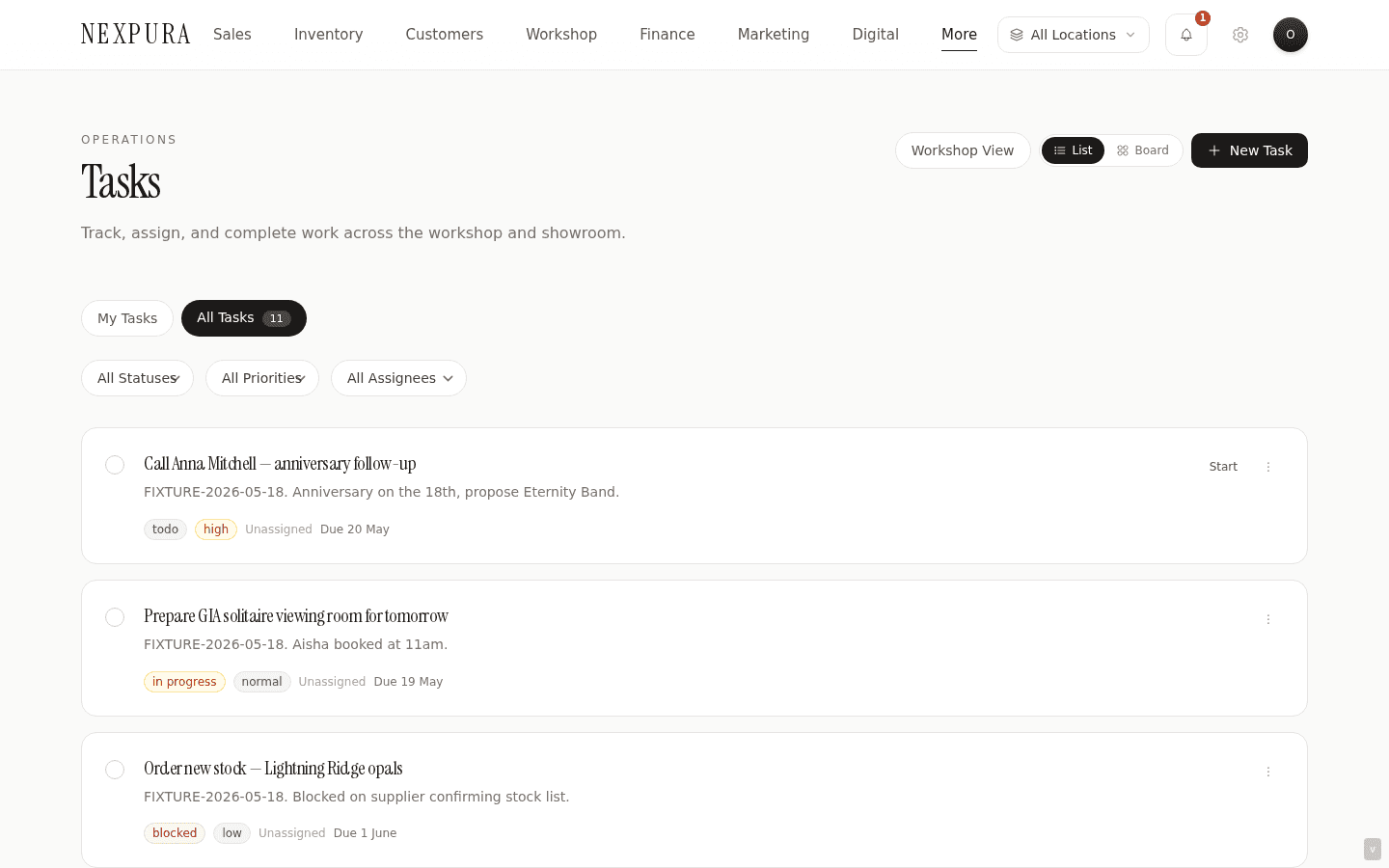
Internal staff tasks on /tasks — My-tasks slice for what's assigned to you, All-tasks slice for owners and managers. Each task carries title, description, assignee, due date, priority, status, optional link to a repair / bespoke / inventory / supplier record, and free-text notes. Assignment notifies the assignee in the Nexpura app. List and Kanban views. The status field drives the per-task badge and the Kanban columns; the priority field drives the colour.
Quick reference
- Tasks live on /tasks with two tabs: My tasks (tasks where assigned_to is you) and All tasks (everything on the tenant — owner / manager only). Each task detail page is at
/tasks/<id>. - Status values: todo, in_progress, blocked, completed, cancelled. Priority values: low, normal, high, urgent. Both drive the badge colour in the list and the column in the Kanban view.
- Tasks can optionally link to repair, bespoke, inventory, or supplier. The linked record renders as a small chip on the task card; clicking the chip jumps to the linked detail page. The same task data filtered to linked_type IN (repair, bespoke) is the /tasks/workshop view, grouped by linked job.
- Two views on /tasks: list view (default) with status, priority, and assignee filters; Kanban view with one column per status. Switch via the icons in the top- right. The Kanban view is drag-to-reassign-status; the cross-assignee gate (below) applies.
- Cross-assignee gate: a staff member can update their own task (status, notes, due date, priority) freely. But re-assigning a task to someone else, or changing the status of a task they are neither assigned to nor created — that's owner / manager only. The check fires inside
updateTaskon every save, not just at button-render time, so curl-bypass attempts are also blocked. - Assignment fires an automated message to the assignee on the channel their tenant has configured — title, due date, and an indicator that it's a new task. Fired both on create with assignee and on re-assignment to a new assignee. Skipped when assignment toggles off, or when the assignee has opted out of notifications, or when the tenant-level task-notifications toggle is off.
- Deletion is owner / manager only — hard role gate, not matrix-configurable, since deleting a task also deletes its attached comments, file attachments, and activity history via the FK cascade.
Walkthrough
1. Open the tasks board
Go to /tasks. The header carries the page title, the My-tasks / All-tasks tab switcher, an Overdue counter (count of your My-tasks rows with a due date in the past), the view-mode toggle (List / Kanban), and a New Task button. Status, priority, and assignee filters live in a row below.
2. Create a task
Click New Task on /tasks (opens an inline form) or jump directly to /tasks/new. The form fields are: title (required), description, assignee dropdown (every team member on your tenant — can be left as Unassigned), due date, priority, status (defaults to todo), an optional Link to dropdown (Repair / Bespoke Job / Inventory / Supplier) with a search-by-recent picker for the matching ID, and free-text notes.
The picker pre-fetches the most recent records of the chosen type so you can type-ahead match by label rather than paste a UUID. If you opened the new-task form by clicking Create Task on a repair or bespoke detail page, the linked-record fields are pre-filled and the title carries the stage name (e.g. “Repair — assessment stage task”) as a sensible default.
3. The assignment notification
If you assign the task to a team member at creation time (or re-assign later via the detail page or Kanban), the assignee is notified in the Nexpura app — in the notification centre and as a push notification on their phone if they use the app. Nexpura doesn't send task notifications by WhatsApp or text message.
Which events each person is notified about is set per team member in Team & Roles. The task itself always saves, whether or not a notification goes out.
4. Update a task as work progresses
From the list view, the per-card menu carries Mark in progress, Mark complete, and an Edit affordance that opens the inline edit modal. From the Kanban view, drag the card into the destination status column. From the task detail page, the Mark Complete button toggles the state directly.
Every status change writes an activity row to task_activities, surfaced on the task detail page's Activity Timeline so anyone opening the task later can see the full history of who moved it where and when. Every re-assignment does the same and additionally fires the assignment notification to the new assignee.
Cross-assignee guard: if you try to move a task you're not the assignee or creator of — or to re-assign someone else's task to a third person — and you're not owner / manager, the save fails with a permission toast. The button might appear available in the Kanban drag-target (the UI doesn't pre-disable cross-assignee moves), but the server-side check on updateTask rejects the action and the card snaps back.
5. Filter, narrow, find
The filters row carries three independent selects: status (todo / in_progress / blocked / completed / cancelled / all), priority (low / normal / high / urgent / all), and assignee. Selections are client-side filters on top of the already-fetched list — there's no server-side narrowing today. On tenants with hundreds of open tasks the page fetches up to 500 rows per tab and filters in the browser.
6. The workshop-tasks slice
For the workshop team, the same task data filtered to linked_type IN (repair, bespoke) is surfaced separately at /tasks/workshop, grouped by linked job. Two repairs each with three tasks show as two cards on /tasks/workshop, each with its three tasks listed beneath. The shape suits workshop staff thinking “which jobs do I have work on right now?” rather than the flat list the main /tasks page provides.
7. The daily morning digest
A daily cron at /api/cron/daily-tasks-digest fires at 9am UTC and matches per-tenant timezone — if it's currently 9am locally for a tenant's timezone, the cron emails every team member on that tenant a digest of their pending tasks. The email is a per-user summary, not a tenant-wide blast.
Two operational quirks to know about today: the cron matches tasks by a status value (pending) the rest of the app doesn't use as the default new-task status (which is todo); and the email body groups tasks by priority rather than by linked job. If you've enabled the digest and don't receive it on a day you have open tasks, the most likely cause is the status-mismatch — see troubleshooting below. The cron itself is wired and runs daily; the symptom shape is “digest sends but reports zero tasks for everyone”, not “cron didn't run.”
Common questions
Why is there a separate /tasks/workshop view when /tasks already supports a linked-type filter?
Two reasons that point the same direction. First, the workshop reader has a different question. The flat /tasks page answers “what's assigned to me?” — a person-centric view. The workshop reader is asking “what does each open job need, across the bench?” — a job-centric view. The same data answers both, but the grouping changes the cognitive shape. /tasks/workshop groups by linked repair / bespoke job; /tasks doesn't. Second, the workshop view doesn't need the filter chrome — every task on it has a linked record already, so the assignee / priority / status filters are noise. Cleaner, focused, workshop-shaped.
The trade-off is two URLs to remember. The right landing depends on the reader: bench staff get /tasks/workshop pinned; counter staff get /tasks. Owners typically check both daily and stay on All-tasks for the round-up.
Why doesn't the Kanban view pre-disable cross-assignee drag targets?
The cross-assignee gate is enforced on the server-side updateTask action — not in the UI. A staff user dragging another user's task to a new column will see the card's drag-target highlight as if the action would work, then snap back when the save fails. That's a real rough edge — the expected polish is to detect the disallowed move at drag-hover and grey out the unavailable targets.
The deeper reason it works this way today is that the role / assignee / creator triple-check that gates the action is non-trivial to compute client-side without duplicating server logic, and the server-side check is the right place for the actual authority decision. The visual feedback gap is on the polish list; the security gap isn't — the action is correctly rejected when attempted, just less gracefully than a cleanly-disabled target would be.
Why is task deletion owner / manager only when the assignee or creator can do everything else on their own task?
Two reasons that point the same direction. First, deletion is irreversible and cascades. A deleted task takes its comments, file attachments, and activity log with it through the FK cascade — every record of what was decided on that task, every uploaded file, gone. That's a destructive operation that shouldn't be self-service from a salesperson who happened to be assigned. Second, the right move for a task that's no longer relevant is almost always cancelled as a status, not deletion — the audit trail of who decided to drop it and why is more valuable than the row being gone. Deletion is reserved for the rare case where the task itself was wrongly created (test data, accidental duplicate, dictated wrong).
The cancelled status is the everyday version of “done with this” — it hides from the My-tasks default filter, preserves the audit, and keeps comments and attachments accessible if anyone needs to revisit later. Owner / manager deletion is the proper cleanup for genuinely wrong data.
The morning digest didn't mention any tasks even though I have several open ones.
The digest cron filters tasks by a status value (pending) that the new-task form doesn't use as its default — new tasks land as todo, not pending. As a result, the daily-tasks-digest email currently renders empty for most tenants regardless of how many open tasks they have, because the SQL match comes back with zero rows. The cron itself fires on schedule; the filter doesn't match real task rows.
In the interim, the /tasks page itself is the reliable daily-status source — the My-tasks tab shows everything assigned to you regardless of status (filterable to open-only via the status dropdown), the Overdue counter highlights what's behind schedule, and the workshop-tasks view groups by job for bench staff. The digest fix is a single-character change in the cron filter; we haven't shipped it because few tenants had the digest enabled until recently and the in-app workflow remained unaffected. If you rely on the digest as your primary morning briefing, ping support — the priority shifts with the count of tenants on it.
Why does a task store both assignee and created_by?
Different authority questions. The assignee is the person currently responsible for getting the task done — drives My-tasks slicing, the assignment notification, and the “you can edit your own task” bypass on the cross-assignee gate. The creator is the person who originally raised the task — drives the second “you can edit your own task” bypass (the creator can still tweak title / priority / due date on a task they assigned to someone else), and surfaces on the activity timeline as the “created by” entry. Both fields stay on the row through re-assignment; only assigned_to flips.
The shape means a manager who creates a task for a salesperson, then reassigns it to a different salesperson when staffing changes, keeps editorial authority over the task itself without needing the owner / manager role gate every time they want to tweak the due date. Useful when shifts change mid-week.
Troubleshooting
Daily morning digest arrives empty for everyone even though we have open tasks
Symptom: the 9am daily-tasks-digest email lands but the task list inside it is empty (or doesn't render at all for users with zero matched tasks), for every team member, every day. Cause: the digest cron filters tasks where status = ‘pending’ — but the new-task form's default status, the Kanban “to-do” column, and every task in the UI uses todo, not pending. The status filter matches zero rows because pending isn't a value the rest of the app writes. Fix: this is a known product bug, not a configuration issue — there's no setting on the tenant side that will populate the digest correctly today. Use /tasks directly as the morning briefing surface in the meantime; the Overdue chip on My-tasks is the fastest read for “what's behind on me today?” If the email digest is load-bearing for your workflow, ping support so we can prioritise the cron-filter fix.
Drag-drop on the Kanban view snaps back when I try to move someone else's task
Symptom: you drag a task card from one column to another on the Kanban view; the card visually moves; within a second it snaps back to the original column. Cause: the cross-assignee gate. The card you're moving isn't assigned to you and you didn't create it, and you're not owner / manager — so the server-side updateTask rejects the status-change attempt with “Only owner or manager can re-assign tasks or change other staffers' task status.” The optimistic UI shows the move first, then reverts on save failure. Fix: ask the assignee or an owner / manager to make the change. If you're an owner / manager and you're still seeing the snap-back, check the toast for a different error — the same UX happens for network failures or column- schema mismatches.
Task notification didn't fire to the assignee
Symptom: you assigned a task on the new-task form (or re-assigned via the detail page) and the assignee says they didn't receive the in-app notification. Cause: the assignee's notification triggers may have task assignment turned off, or push notifications may be switched off on their phone. The task itself still saved either way. Fix: check the assignee's notification triggers in Team & Roles, and ask them to check the Nexpura app's notification permission on their phone. The notification doesn't re-send automatically once the gate is fixed — you'll need to re-assign the task once (assign to someone else and back, or save the same assignment again) for the new notification to fire.
Overdue counter shows a number but I can't find the overdue task in the list
Symptom: the overdue chip on /tasks header shows e.g. “3 overdue” but scrolling the My-tasks list you don't see three obviously overdue cards. Cause: the Overdue count uses the tenant timezone (set on the tenant row at /settings/business-profile) to decide “past today.” The card-level due-date render uses the browser locale. On a tenant configured for Sydney while you're logged in from London, the “today” cut-off for the counter is Sydney's today, the displayed due dates are London-local — a task due 31 March in Sydney shows as Mar 30 / Mar 31 depending on time of day in London. Different displays, same data. Fix: the counter is correct (it matches the tenant calendar). If you need the card display to match, the workaround today is to confirm the due-date column by hovering or opening the task detail page — both show the unambiguous YYYY-MM-DD on the tenant calendar. A unified-tenant-calendar display polish is on the list.
All-tasks tab doesn't show for me even though I'm supposed to be a manager
Symptom: you open /tasks and only see the My-tasks tab; there's no All-tasks switcher next to it. Cause: your role is below manager (salesperson, workshop-only) for this tenant — the All-tasks tab is owner / manager only. The page-level role read is cached on the auth context; if the role was recently elevated, the cached read might still show the old role until the session refreshes. Fix: ask the owner to confirm your role under /settings/team — if you're listed as manager or owner and still not seeing the tab, sign out and back in to refresh the session. The role gate is server-rendered, so a hard refresh alone won't pick up the new role.
Related
- Comments and attachments — what the task detail page's Discussion thread and Attachments sidebar actually do, with the comment-edit-not-supported gotcha
- Task templates — the per-tenant template library at /settings/task-templates and the “no one-click apply” workflow gap
- Workshop — the repair / bespoke pipelines that create most linked tasks; /tasks/workshop is the linked-only slice of this same data
- Repair pipeline — the per-stage Create Task affordance pre-fills the linked-type / linked-id fields on /tasks/new
- Team and roles — the matrix that drives the All-tasks tab visibility, the cross-assignee gate, and the deletion gate