Anniversary, birthday, and reminders
Structured birthday, anniversary, spouse-name, and spouse-birthday fields on the customer record, with the /reminders surface that gathers them alongside repair-ready / bespoke-ready / customer-tasks into one upcoming-this-month dashboard. Manual outreach today; the automated outreach layer that turns a surfaced reminder into a sent message without anyone clicking is being built next.
Quick reference
- Four structured date fields live on every customer row: birthday, anniversary, spouse name, spouse birthday. All four are optional, all four feed the same upcoming-events pipeline.
- The /reminders surface is the daily dashboard for everything time-sensitive — birthdays in the next 30 days, anniversaries in the next 30 days, repairs ready for collection, bespoke jobs ready for collection, and tasks assigned to you due in the next 7 days.
- Each reminder card carries a contact line (mobile, email — whatever's on the customer record) and a link into the customer detail page. Manual outreach is one click away: open the customer, send the message through whatever channel your tenant has configured.
- Reminders can be dismissed (hide for good) or snoozed (hide until a later date) per-user — your dismissals don't affect a colleague's view of the same reminder.
- The marketing-automations surface at /customers/automation carries on/off toggles for Birthday Greeting, Anniversary Reminder, and other date-driven campaigns. The toggles persist; what they don't yet do is fire automatically — see the honest disclosure section below for the current state of the automation execution loop.
Walkthrough
1. Capture dates on intake
The customer add / edit form (covered in Adding and editing customers) has an Important Dates section with date pickers for birthday and anniversary, plus the spouse name and spouse birthday fields. Capture them at intake — the moment of the engagement-ring sale, the bespoke commission kick-off, the first walk-in for a consultation. The dates only feed the surfaces below if they're on the record.
Year matters less than month and day for the upcoming-this-month rendering — the dashboard reads MM-DD across all stored years. A customer with a birthday of “1970-03-28” surfaces every year on March 28th the same way as one with “1992-03-28”. If you only know the month and day, pick any sentinel year (1900 is common); the rendering ignores it.
2. Open the reminders dashboard
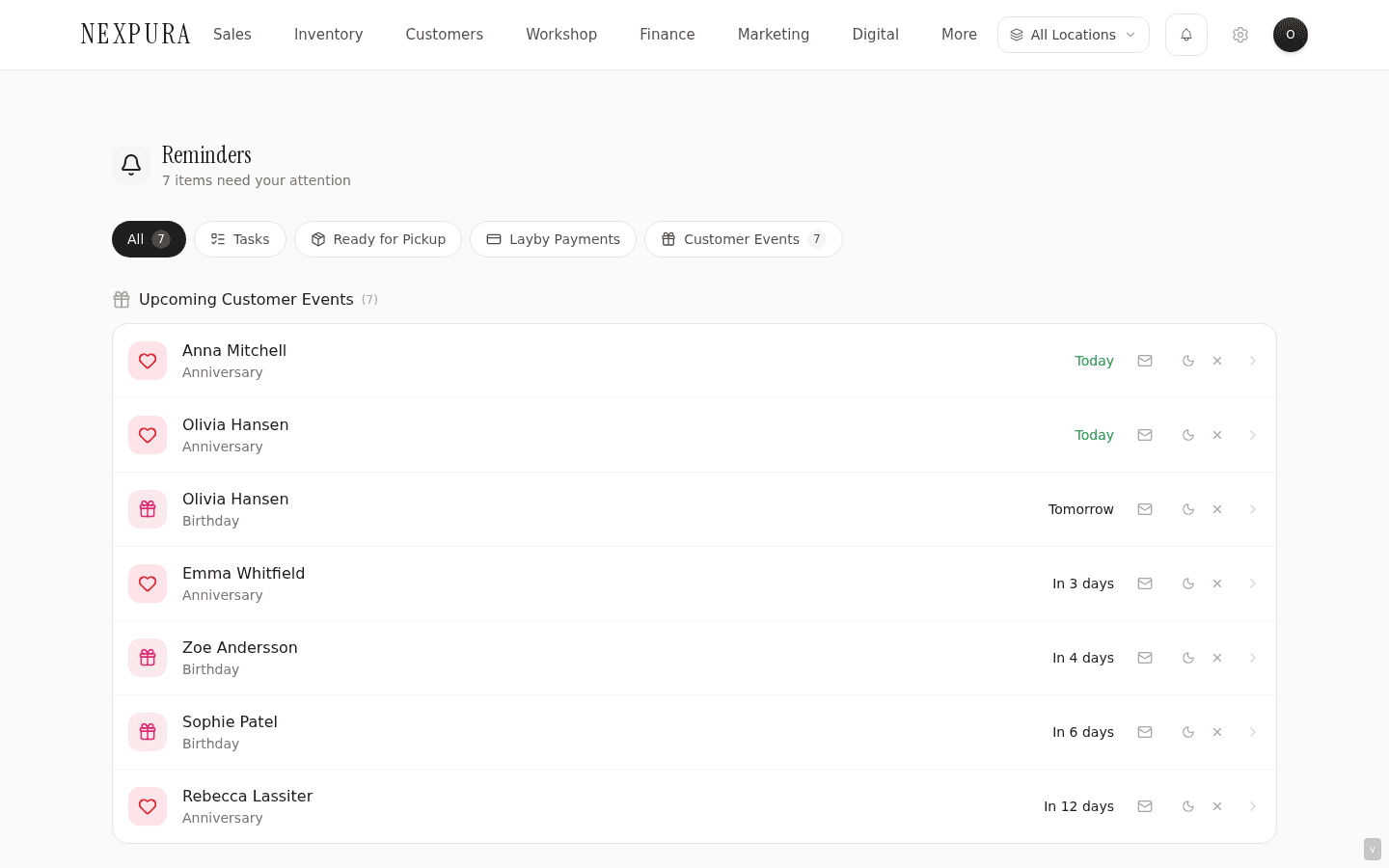
Go to /reminders. The page is structured as a vertical sequence of panels — each panel groups a category of reminder, each card inside a panel is a single actionable item.
3. Read the customer-event panels
Birthdays this month and Anniversaries this month are the two customer-event panels. Each card shows the customer name, the upcoming date, a contact line (mobile + email), and a small “X days” chip telling you how soon the date arrives. Cards are sorted by days-until ascending, so the most-imminent dates lead.
The lookahead window is 30 days. A birthday tomorrow and a birthday in 28 days both show; a birthday in 31 days waits until the window catches up. Past dates drop off after the day passes — the panels are forward-looking, not retrospective.
4. Reach out
Click the customer name on any reminder card to open their detail page in a new tab. From there: send a 1:1 email through the email button on the hero card (recorded in the Communications tab), or call the mobile, or note the upcoming date in the workshop calendar for a piece you want to have ready by the day. The dashboard is the prompt; the action is yours.
For more structured outreach across multiple customers — “send everyone with an anniversary this month a curated pick” — the right tools are the marketing segments surface and the campaign builder (covered separately under Marketing & Automations). The reminders surface is built for 1:1, in-context, customer-by-customer touch.
5. Dismiss or snooze
Each reminder card carries a small dismiss control and a snooze control. Dismiss hides the reminder for good on your account — useful when you've already acted on it (called the customer, sent the email, the date is handled). Snooze hides it for a chosen number of days — useful when the right action is “remind me next week, I want to call her on Wednesday.”
Dismissals and snoozes are per-user. A reminder you've dismissed still surfaces for a colleague looking at the same dashboard. This is deliberate: one staff member taking the action shouldn't hide the reminder from another staff member who might have a stronger relationship with the customer. The underlying customer record isn't touched by a dismissal — only the per-user view.
6. Configure the automation toggles
The marketing-automation surface at /customers/automation lists every date-driven automation Nexpura recognises — Birthday Greeting, Anniversary Reminder, Repair Ready Reminder, Re-engagement (Lapsed), Post-purchase Thank You, Appointment Reminders (24h / 1h), and seasonal campaigns (Valentine's / Mother's Day / Christmas). Each row carries a toggle, a configured trigger description, and the action that would fire (e.g. “send birthday email with optional discount”).
The toggles persist immediately when flipped — owner / manager only, since they fire customer-facing messages on your tenant's behalf. There's a Test run affordance per row for birthday and anniversary automations that returns the count of customers who'd be matched today if the automation fired (a dry-run preview), without actually sending anything. What the toggle being on does NOT yet do is actually fire the message — see the honest disclosure below.
Honest disclosure
Two halves of the same workflow — the data-capture-and- surface half and the auto-fire half — are at different maturity levels today. The honest split:
What's shipped today
The structured date fields (birthday, anniversary, spouse name, spouse birthday) are real columns on the customer record. Every save captures the date the way the form describes. The /reminders surface reads those columns plus the rest of the time-sensitive sources (ready repairs, ready bespoke, your assigned tasks) and renders the upcoming-this-month dashboard reliably — owner walking in on the 1st of the month sees who they should be reaching out to in time to actually do something about it. The dismiss / snooze controls are shipped and per-user. The 1:1 outreach path from a reminder card into the customer detail page's send- email button works end-to-end.
The marketing-automation configuration UI is also shipped — every date-driven automation has a toggle, settings (days-before, template selection), persistence to the marketing_automations table, and a test-run dry-preview that returns the count of customers who'd match today. The configuration surface is done.
What's in build
The execution loop behind the automation toggles. The toggle for “send anniversary email” exists in the marketing UI; the cron job / worker that reads the marketing_automations table, finds the matched customers for the day, picks the configured template, and actually dispatches the message — that doesn't yet fire. Toggling Birthday Greeting on today persists the preference; no message goes out on the customer's birthday next week without someone manually opening the customer and sending one.
The interim posture is honest: capture the dates, surface them on /reminders for someone to actually act on, and let staff send manually through the 1:1 email modal or through a marketing campaign targeted at the birthday-this-month segment. The execution loop is the next layer up — the reason the configuration UI ships first is so the “automation on, automation off” intent persists and is honoured the moment the runner lands; tenants who configure today won't need to revisit when the runner ships.
Related product context lives on the problem page at The forgotten anniversary — same honest framing, written for a different audience (a store owner evaluating Nexpura rather than a staff member configuring it). Talk to us if these are load-bearing for your store.
Common questions
Why ship the configuration UI before the runner that actually fires the automations?
Two reasons that point the same direction. First, the configuration is the harder design problem. Deciding which automations exist, what their triggers should be, how the days-before settings work, which templates plug in, and how operators think about turning them on or off — that's a UX surface that needs real-store-owner feedback to get right. Shipping it early without the runner behind it lets us learn what the actual interface should look like from operators using it manually alongside the /reminders surface. Second, capturing intent now means the runner can fire correctly from day one when it ships — a tenant who's configured Birthday Greeting today and starts seeing messages go out the day after the runner lands doesn't need to revisit anything. Operators who'd held off configuring because they couldn't see the surface yet would be late to activate.
The cost is the gap documented above — the toggle being on today is a record of intent, not a guarantee of execution. That cost is real, and is why the honest disclosure leads with it.
Why does the dashboard surface dates from a 30-day lookahead instead of just “this month”?
The forget-and-rush failure mode is the worst case. A customer's anniversary on the 5th of next month, surfaced on a strict-calendar-month view, wouldn't appear until the 1st — five days of lead time that's rarely enough to think about the piece, place an order, or set up a workshop window. A 30-day rolling window keeps the lead time consistent regardless of where in the calendar you are — a birthday on the 28th is visible from the 28th of the prior month onward, which is enough time to actually do something.
The trade-off is that the dashboard can read busy at the start of a month when all of the current month's dates AND the early-next-month dates are visible together. That's the right direction of error — too much lead time beats not enough.
Why is dismiss per-user instead of per-tenant?
Reminders are about staff-to-customer relationship workflows. The same upcoming birthday might prompt three different staff members to act in three different ways: the original-sale associate has a relationship and would call; the workshop manager wants to flag a piece ready for that anniversary; the owner wants to check the marketing-campaign segment is built. One of them dismissing the reminder shouldn't hide it from the other two — they have different roles in the response.
The other model — tenant-wide dismiss — would make the dashboard a shared inbox where one person's cleanup is everyone's cleanup. That works for a different shape of workflow (a single-thread support queue) but not for relationship-driven outreach. The dismiss-per-user choice keeps each staff member's view tuned to their own context.
How do reminders interact with the marketing campaign segments?
/reminders is for 1:1 in-context outreach; segments + campaigns are for batch outreach to a cohort. They share data but have different goals.
Concretely: the “Birthdays this month” KPI on the customer hub at /customers counts the same customers the /reminders dashboard surfaces individually. The segments page surfaces the same cohort under a “Birthday this month” segment so a campaign can target them all at once. Three views, one data source: the reminders dashboard is the operator workflow, the KPI is the hub orientation, the segment is the campaign target.
What happens to a customer's past birthday after it passes — do the previous-year dates clutter the dashboard?
No. The dashboard reads MM-DD across all stored years and compares against today + 30 days. A customer born on March 28, 1970 surfaces every March from late February (when March 28 falls within the 30-day window) and drops off March 29. The stored year doesn't affect the upcoming-in-30-days check at all — it's strictly the month and day that matter.
This means a customer with a known birthday but unknown year (entered with a sentinel like 1900) works identically to one with a real birth year. The dashboard reads them the same. The hero-card detail-page rendering of the birthday does show the year — see the related troubleshooting entry if a sentinel year is showing on the customer page in a way that's misleading.
Troubleshooting
Birthday Greeting automation is on but the customer didn't get an email on their birthday
Symptom: the toggle at /customers/automation is on, the customer has a birthday on file, the date passed — but no email went out. Cause: expected today, documented in the honest disclosure section above. The execution loop that actually dispatches automated messages isn't wired up yet; toggle state is a record of intent, not a guarantee of execution. Fix: until the runner ships, the manual path is to act on the reminder from /reminders — open the customer, click Send email on the hero card, send the birthday message. Or build a Birthday segment in the campaigns surface and send the cohort all at once. Both leave a record on the customer's Communications tab.
A customer doesn't show on the birthdays panel even though their birthday is in two weeks
Symptom:a customer with a known birthday isn't surfacing on the Birthdays this month panel. Cause:three candidates. (1) The birthday field is empty on the customer record (more common than expected — especially on records that came in via web enquiry or sync, where intake forms don't always capture the date). (2) The customer has been dismissed by you on this dashboard. (3) The customer is soft-deleted. Fix:open the customer's detail page. If the Overview tab shows “Birthday: —”, edit the record and add the date. If the customer is soft-deleted, the dashboard correctly skips them. If the customer card is just hidden by a dismiss action, the dismissal is per-user — log out and back in to check, or use the dashboard's reset affordance (when implemented; today this requires support to clear the dismissal row).
Snooze didn't hide the reminder
Symptom: you snoozed a reminder for “1 week” and the card is still visible after refresh. Cause:two candidates. (1) The snooze didn't persist — network blip during the action. (2) Browser cache showing the pre-snooze render. Snooze writes to reminder_dismissals with a futuresnoozed_until timestamp, and the dashboard filter at load time skips any reminder whose key is in that table with a future snoozed_until. Fix:hard- refresh the page (Cmd+Shift+R) to bypass any cached payload. If the reminder still surfaces, re-snooze it (the action is idempotent — it'll re-write the row). If the issue repeats across dashboard loads, contact support with the customer / reminder ID.
Test run on a birthday automation returns 0 matches when I know I have birthdays this month
Symptom: the Test run affordance on the Birthday Greeting automation returns “0 customers would match today” but the /reminders dashboard shows birthdays this month. Cause: the two surfaces use different windows. /reminders shows a 30-day forward window. The test-run match count uses the configured days_before offset from today specifically — defaults to 0, meaning “match customers whose birthday is exactly today.” On a Tuesday with no birthdays falling exactly on Tuesday, the count is correctly 0 even though there are upcoming birthdays this month. Fix: if you want the automation to fire the configured number of days before the birthday, set days_before in the automation settings to the lead time you want (e.g. 7 to fire one week before). The match count then reflects customers who match “today + 7 days.”
The /reminders dashboard takes a long time to load for a large tenant
Symptom: the page renders slowly — multi-second wait before cards appear. Cause: the dashboard issues parallel fetches across tasks, repairs, bespoke jobs, and the full customer set (for the date filter). On tenants with tens of thousands of customers the client-side date filtering on customer rows dominates the load time. Fix: there's a planned migration toward a materialised view of upcoming customer dates that short-circuits the full customer-table read. If you're hitting this regularly on a large tenant, let us know — the priority of the materialised view depends on real tenant pain.
Related
- Related: The problem this solves — “The forgotten anniversary” — the customer-facing framing of the same automation-execution gap
- The customer record — the date columns this page depends on
- Adding and editing customers — capturing the dates at intake
- Clienteling workflow — turning a surfaced date into a high-value-customer touch
- Marketing automations — the cross-section view of the same toggles, with template selection and dry-run preview