The customer record
What a customer row holds — personal details, contact, address, jewellery preferences (ring size, preferred metal, allergies), important dates (birthday, anniversary, spouse birthday), tags + VIP flag, store credit, and the customer-since date — and how the customer table at /customers surfaces it.
Quick reference
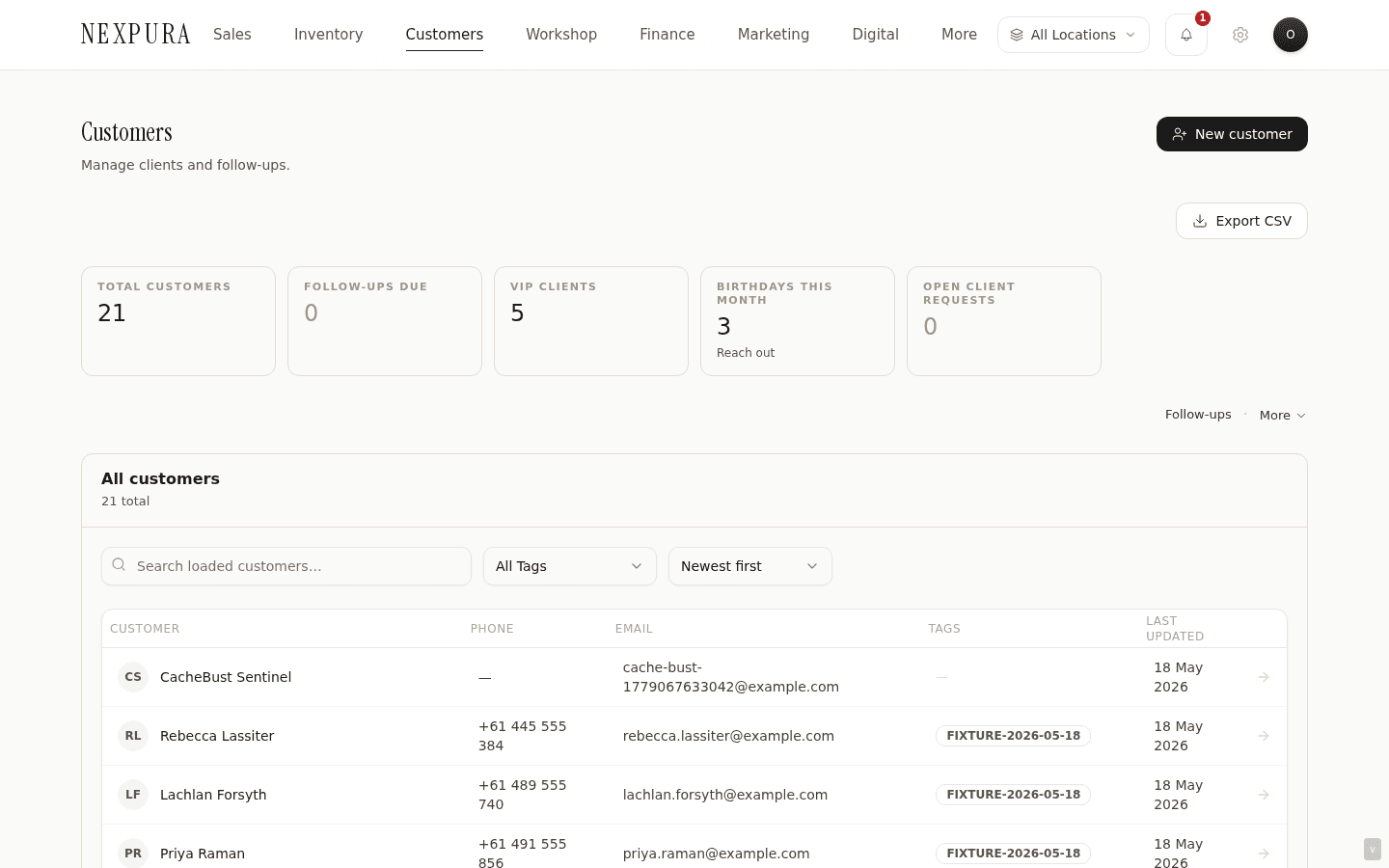
- The customer list lives at /customers — every customer in your tenant with a KPI strip across the top (Total / Follow-ups due / VIP clients / Birthdays this month / Open client requests), a search box, tag filter, sort selector, and the customer table beneath.
- One customer = one row. The record carries first / last / full name, email, mobile, landline phone, address (street, suburb, state, postcode, country), jewellery preferences (ring size, wrist size, preferred metal, gold preference, allergies), important dates (birthday, anniversary, spouse name, spouse birthday), customer source, communication preference, tags (free-form string array), the is_vip flag, store credit, the customer-since date, and the loyalty-points balance.
- The personal-details fields (address, ring size, preferred metal, allergies, notes) are encrypted at rest via the pii_enc bundle — plaintext PII columns are not populated on save. The detail page decrypts on read so staff see the values normally, but the underlying row doesn't carry the readable strings.
- Tags are a flat string array on the row. Four canonical tags (VIP / Wholesale / Trade / Regular) get coloured badges; anything else is rendered as a plain tag. The VIP tag is also mirrored to the dedicated is_vip boolean column so the KPI strip, the list filter, and the segments page can read it without scanning the tags array.
- Search hits run client-side over the loaded set (the most recent 200 customers) first; once you type three or more characters and the loaded set can't satisfy the query, a server-side fuzzy search auto-fires across the full tenant.
Walkthrough
1. Open the customer list
Go to /customers. The page leads with a five-card KPI strip — Total customers, Follow-ups due, VIP clients, Birthdays this month, and Open client requests. Each KPI is a link: Follow-ups due jumps to /reminders, VIP clients filters the list down to the VIP segment, Birthdays this month is read-only context for outreach planning, Open client requests links to the enquiries surface.
2. Understand the row shape
Every row in the table renders the customer's initials in an avatar, their full name, phone (mobile preferred, landline fallback), email, tags (with the VIP and Wholesale tags getting coloured badges), and the last- updated date. Clicking anywhere on the row opens the detail page at /customers/[id] with the full tab structure walked through under Customer history.
3. Search, tag-filter, and sort
The search box does a client-side filter over the loaded set first (name, email, phone, mobile — case-insensitive substring match). The loaded set is the most-recent 200 customers; for tenants under that threshold, all customers are loaded on first paint and the local filter covers the full population.
Once you type three or more characters AND the local filter result is too thin to be useful (fewer than 5 matches), a server-side fuzzy search auto-fires after a 250ms debounce — runs across the full tenant using a pg_trgm index so typos and stem variations also match. Server matches that aren't already in the loaded set render under a separate “Matches across all customers” section beneath the main table; duplicates are filtered out so the same row never appears twice.
4. Read the field categories
The record is grouped on the add / edit form into five sections, each backed by its own slice of the customer row:
- Personal details. First name, last name, email, mobile, landline phone. Email is unique per tenant — the save flow rejects a second customer with the same email and surfaces the existing row as a duplicate.
- Address. Street, suburb, state, postcode, country (defaults to Australia). Address fields are encrypted at rest in pii_enc; the detail page decrypts on read.
- Jewellery preferences. Ring size (A through Z+ in the standard half-size ladder), preferred metal (Yellow Gold / White Gold / Rose Gold / Platinum / Silver), wrist size, gold preference (separate from metal — e.g. 18ct vs 22ct), allergies (rendered with a red warning chip on the detail page when set).
- Important dates. Birthday, anniversary, spouse name, spouse birthday — all four roll into the /reminders surface for upcoming dates this month. The anniversary and birthday columns specifically drive the corresponding marketing automation toggles; see Anniversary, birthday, and reminders for the full picture.
- Tags. A free-form string array. Four canonical tags get coloured badges (VIP gets amber, Wholesale gets amber, Trade gets stone, Regular gets taupe); any other tag renders as a plain stone chip. Selecting the VIP tag also flips the is_vip boolean column on the row so the KPI strip and the list filter can read it directly.
5. Recognise the synthesised fields
A handful of values surface on the customer detail page aren't directly stored on the row — they're computed at render time from the linked records:
- Lifetime spend on the hero card is the sum of every invoice on this customer with status = paid. The detail-page Invoices tab is the underlying record set.
- Last visit is the most-recent paid_at timestamp across the customer's paid invoices, falling back to the invoice creation date when no payment date is recorded.
- Store credit balance is the running balance from customer_store_credit_history; the Store Credit tab shows every credit / debit transaction. Add and redeem are operator-initiated; see Customer history for the read view.
- Loyalty points + tier live on the customer row (loyalty_points, loyalty_tier) but the tier (Bronze / Silver / Gold / Platinum) is presented as if it were derived from the points balance, with a progress bar showing distance to the next threshold.
6. Export the list
The Export CSV button on the page header pulls every customer in your tenant into a structured CSV — name, email, phone, tags, VIP flag, created date, updated date. Useful for one-off migrations, agency hand-offs, or tax-time exports. The export honours the same encrypted- PII contract as the read path: address and notes fields are decrypted on the server before they hit the CSV, so the file is human-readable, not the encrypted bundle. (Schedule and retention discipline is your call — treat the file as you would any customer dump.)
Common questions
Why is the VIP flag stored twice — once in the tags array and once as the is_vip column?
The tag array is the operator-facing surface; staff add and remove tags through the form chip buttons, and the array supports arbitrary tenant-specific tags (Corporate, Bridal, Collector, etc.) without a schema change per tag. The is_vip boolean column is the index-friendly short-circuit for the queries that need to filter by VIP status fast — the KPI strip count, the ?segment=vip list filter, the segments page's VIP cohort. Without the column, every one of those would have to scan the JSONB tags array on every row.
The save flow keeps the two in sync: selecting the VIP chip on the tags form writes the string into the tags array AND flips the is_vip column to true. If you somehow get a row where the tag and the column disagree (a direct DB edit, a CSV import that didn't set one of them), the list filter trusts the column, while the hero-card pill on the detail page reads the column. The detail page dedupes case-insensitively so a stray “VIP” in the tags array alongside is_vip = true doesn't render the badge twice.
Why are loyalty points on the customer row but store credit and credit history split across two surfaces?
Different evidentiary needs. Loyalty points are a soft balance — earned on purchase, spent on discount, conceptually a counter. The current balance is the only number the operator usually needs, and storing it on the customer row keeps the hero card read fast.
Store credit is real money owed to the customer. Every credit (refund-as-credit, gesture-of-goodwill add, voucher reversal) and every debit (POS redemption) needs a row in customer_store_credit_history with the amount, the reason, the running balance, and a reference back to whatever sale or refund triggered it. The balance on the row is computed from the history; the history is the audit trail. A customer who calls saying “I had $200 of store credit and now it shows $80” needs to be able to see every line. Loyalty points don't carry that accountability load.
Why is search local-first with a server-side fuzzy fallback, instead of just always hitting the server?
Most queries against a customer list are recent-customer-shaped — someone who came in this week, last month, the regular who's been in twice this year. The loaded-200 set covers those instantly with no round-trip. The local filter is also forgiving in a different way than the server filter: it matches against any substring of name, email, phone, mobile, so a customer who's in the loaded set surfaces on any partial input.
The server-side fuzzy search backs that with a pg_trgm index across the full tenant — for the customer who hasn't been in for two years, for the customer whose name was misspelled on intake, for the corporate account with five variations of the same business name. It auto-fires when the local filter result is too thin, so the operator doesn't have to explicitly switch modes. The two layers split the load: fast feedback on the common case, depth on the long-tail case.
Why is address encrypted at rest but name isn't?
Threat model. Address + notes + identifying preferences (ring size, allergies) are the high-sensitivity fields — together they're enough to walk up to the customer's door, and the “allergies” field can carry actual medical context. Name and contact email are the workflow keys — they hit every query, every join, every audit row, and every UI surface that renders a customer. Encrypting them would force decryption on every list page, every search, every cross-table query, with no proportionate threat- model gain because name + email are present on every related record (invoices, repairs, bespoke jobs, communications) anyway.
The decryption is a per-row read on the detail page — single-customer scope, server-side, transparent to the staff member. CSV exports decrypt before the file is built so the operator gets the same readable file they'd get if nothing were encrypted. The attack surface that's actually closed by the encryption is a database-level dump or a hostile read against the row — at that depth, name + email are already compromised elsewhere, but address + allergies stay protected.
Why is “customer since” a separate field from the row's created_at?
Migration realism. The created_at timestamp is the date the row was inserted into Nexpura — which for an established store importing from another system is the date you cut over, not the date the customer first walked through your door. The customer_since field is the operator- settable “real” relationship start; a customer you've known for fifteen years gets an honest customer_since of fifteen years ago and a created_at of cut-over day. The hero card renders the former; the list table's “Newest first” sort uses the latter. On a fresh tenant adding customers from scratch the two will usually match.
Troubleshooting
KPI strip shows a number that doesn't match what I see in the list
Symptom:the Total customers KPI reads e.g. 1,240 but the list footer says “Showing 200 of 1,240”. Cause: not a bug — the list paginates 200 customers per load and the KPI is the total population. Click Load older at the bottom of the table to extend the loaded set, or use the search to find a specific record (the server-side fuzzy fallback fires automatically once the local filter is too thin). Fix: n/a — expected behaviour.
VIP filter returns zero customers but I know I have VIPs tagged
Symptom: the ?segment=vip list filter shows an empty table even though several customers display the VIP badge in the normal list view. Cause: the VIP filter reads the is_vip column directly, not the tags array. If a customer was imported with the VIP tag in the array but the is_vip column wasn't set, the badge renders (the detail page reads either source) but the filter misses them. Fix:open the affected customer's edit form, deselect the VIP chip, save, then re-select VIP and save again. The save path writes both the tag and the column this time. If it's many customers, ask support to run a one-line update that syncs the column to the tag presence across the tenant.
Search input doesn't find a customer I know exists
Symptom:a customer's name (or email) is typed correctly but the list shows “No matches in loaded customers” and the “Matches across all customers” section also empty. Cause:three likely candidates. (1) Typo in the stored record — the server-side fuzzy search tolerates a couple of characters of edit distance, but big misspellings still miss. (2) The customer is location-restricted and the current staff member doesn't have visibility (location-scoped customer visibility is enforced server-side). (3) The customer is soft-deleted (archived). Fix: try a fragment of the name or the phone number; if that also fails, ask a manager or owner to search — they have full-tenant visibility. If still nothing, the record may have been archived; ask support to confirm against the archived set.
Export CSV is missing the address column values
Symptom: the exported CSV downloads but address-related columns (street, suburb, state, postcode, country) come out blank for every row. Cause: the encryption Phase 3 rollout (April 2026) nulled the plaintext mirror columns on save — the pii_enc bundle became the source of truth, and the export endpoint needs to decrypt on read. Fix:the export endpoint does decrypt PII before serialising to CSV today; if you're hitting blanks anyway, the row was likely written via a path that didn't populate pii_enc (very old rows before the encryption rollout, or a direct DB write). Contact support with the customer ID so we can backfill the encrypted bundle from any remaining plaintext copy.
A customer's lifetime-spend number on the hero card doesn't match the Invoices tab total
Symptom: the hero card shows e.g. $4,200 lifetime spend but summing the invoice totals in the Invoices tab gives a higher number. Cause: lifetime spend only counts invoices with status = paid. Draft, sent-but-unpaid, partially-paid, voided, and refunded invoices are excluded from the lifetime-spend sum but render in the Invoices tab list. This is intentional — the card reads “Lifetime Spend” meaning money actually received, not money invoiced. Fix:n/a — expected. If you need the money-invoiced-regardless-of-payment number, the Invoices tab footer shows every line; sum manually or pull the customer's data from the export.
Related
- Adding and editing customers — the form that creates and updates the rows this page describes
- Customer history — the detail-page tab structure that surfaces every record linked to this customer
- Anniversary, birthday, and reminders — what the structured date fields drive on /reminders
- Clienteling workflow — VIP outreach, segments, 1:1 customer email, notes
- Web enquiries — how a customer-facing enquiry turns into a customer record