Receiving web enquiries
The web-enquiry inbox at /enquiries collects what comes in from your storefront contact, appointment, and repair-enquiry forms. Walked end-to-end — what the customer sees, what you receive, and how to convert each one into a customer record plus a repair, quote, or sale.
Quick reference
- The inbox lives at /enquiries on the jeweller side. Three storefront forms feed it: general (/enquiry), appointment (/appointments), and repair (/repairs) — each tagged with the matching enquiry_type so the inbox can filter on it.
- Statuses cycle: new → contacted → booked → completed, with converted as a terminal state set automatically when you turn an enquiry into a downstream record. The default filter is new so handled rows drop out of your view once you progress them.
- Three conversion targets are wired today: convert into a repair, into a quote, or into a sale. Each conversion creates (or matches) a customer row by email or phone and then creates the downstream record seeded with the enquiry content.
- Appointment-typed and general-typed enquiries handle via the status workflow without an automatic downstream record — you call or message the customer back, mark the enquiry contacted / booked / completed as the conversation progresses.
- Conversion is idempotent — if an enquiry is already converted, hitting convert again returns the existing destination ID rather than creating a duplicate. Conversion requires owner, admin, or manager role; status-only updates are open to staff with inbox access.
The end-to-end walkthrough
1. What the customer submits on the storefront
The customer reaches one of three forms on your storefront subdomain (see Your storefront on Nexpura):
- General enquiry at /enquiry — name, email, phone, free-text message. Optionally item-scoped if the customer arrived from a catalogue item page.
- Appointment request at /appointments — name, contact, appointment type, preferred date and time.
- Repair enquiry at /repairs — name, contact, item description, issue description, optional photos.
Each form submission writes a row to shop_enquiries with enquiry_type set to general, appointment, or repair, and the status defaulting to new. The row is tenant-scoped — only your shop's submissions land in your inbox.
2. The inbox itself
Open /enquiries to land on the inbox. The page header shows your unread count (“3 new”) — the count of rows in the new status across the tenant. Two filter dropdowns let you scope the list: a type filter (general / repair / appointment / all) and a status filter (new / contacted / booked / completed / all). The default load shows new-status rows of all types.
Each row in the list shows the type pill, the status pill, the customer's name, a one-line preview (the item description for repairs, the appointment type for bookings, or the message body for general enquiries), and the submitted timestamp. Click a row to open the detail panel on the right.
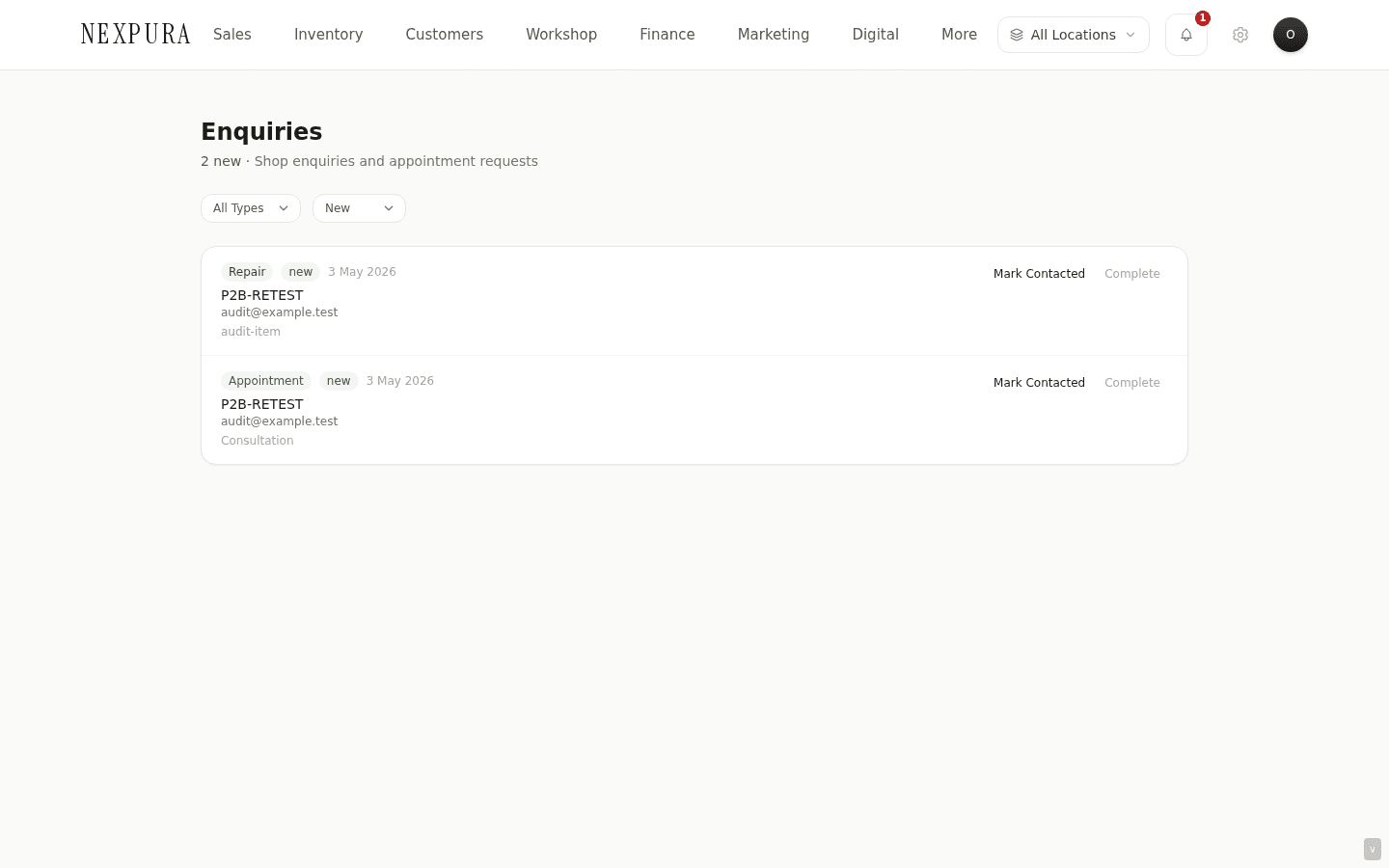
3. The enquiry detail panel
The right-side detail panel shows the full submission: customer name, email, phone, the message in full, plus type-specific fields (preferred date and time for appointments, item description and issue description for repairs, item attached if a catalogue item was the entry point for a general enquiry). The status pill at the top reflects the row's current state.
Two action groups live beneath the body. The Mark as row exposes status-change buttons — New, Contacted, Booked, Completed — pressing one updates the row synchronously and reflects on the inbox list. The Convert row exposes three buttons — Convert to repair, Convert to quote, Convert to sale — each kicks off the conversion flow described below.
4. Converting an enquiry to a repair / quote / sale
Pressing one of the three convert buttons runs the conversion saga server-side:
- Customer matching. The conversion looks for an existing customer row in your tenant by the submitted email first, then by the submitted phone if email doesn't match. If a match is found, the conversion attaches to that customer; if no match, a new customer row is created with the submitted name, email, and phone.
- Downstream record creation. A new repair / quote / sale row is created with the matched-or-created customer attached. The enquiry content is carried across — the message body becomes the description on a quote, the item description seeds a repair, the message becomes the notes on a sale.
- Enquiry status flips to converted. The original row in shop_enquiries is updated with destination_type and destination_id pointing at the downstream record. The row drops out of the active-status filters and the conversion is audit-traceable.
- Navigation. The UI navigates to the downstream record so you land on the new repair / quote / sale detail page and can keep working from there.
Re-clicking convert on an already-converted enquiry (rare but possible if a second staff member opens the row before noticing the converted-state) returns the existing destination — the conversion is idempotent by design, so you can't accidentally create duplicate downstream records from the same enquiry.
5. Handling an appointment request
Appointment-typed enquiries don't go through the convert-to-repair / quote / sale flow — the right response is usually a phone call or message back to the customer to confirm or counter-propose a time. The flow you typically use:
- Open the appointment enquiry and read the preferred date and time fields.
- Reply to the customer through your normal communication channel — phone, email, or the channel your tenant has configured for outbound.
- Mark the enquiry contacted while you wait for confirmation, then booked once you and the customer have agreed a slot, then completed once the appointment has happened.
- If the appointment was for a high-value piece you want a quote on, you can also Convert to quote from the same enquiry detail — the quote attaches to the same customer without losing the appointment trail.
The status-only path keeps the customer record clean — you don't end up with a stub repair or sale row that doesn't correspond to a real downstream job.
6. Handling an informational / general enquiry
General-typed enquiries (no item attached, no specific downstream entity to create) handle the same way as appointments — reply through your normal channel, walk the status from new to contacted tocompleted as the conversation progresses. If the conversation produces a real intent — a piece to quote, a repair to book — convert at that point with the right target.
7. Audit trail
Every status change and conversion writes to the audit log — who acted, when, the old status, the new status, the destination type and ID if a conversion happened. The log is queryable from the admin tools and gives you a complete history of how each storefront enquiry was handled by your team. Useful when you need to reconstruct “what happened to that customer who reached out three weeks ago” without relying on memory.
Common questions
Why three different storefront forms instead of one generic contact form?
Two reasons threaded together. The customer-side reason is that each form prompts for the right fields up front — a repair enquiry asks about the piece and the issue, an appointment asks about preferred timing, a general contact stays open-ended. Funnelling them all through one generic form means the customer either skips the type-specific details (you end up calling to ask for them) or the form bloats with conditional fields that everyone has to scroll past. The inbox-side reason is that the type-tagged rows let you filter and triage — an empty repair inbox is a different signal than a busy general-enquiry inbox, and your staff can split the work along those lines.
Why does conversion to a quote / sale exist if I can already convert to a repair?
Not every storefront enquiry is a repair. A general enquiry where the customer is asking about a piece you stock and wants the price — that's a quote, not a repair. An enquiry where the customer wants to buy a specific catalogue item over the phone — that's a sale, not a repair. Three conversion targets cover the three real destinations the inbox feeds into; the right one depends on what the customer actually needs.
What if the customer's email matches an existing customer who used a different name?
The conversion uses email-first matching, so a match on email attaches to that customer regardless of the submitted name. The submitted name from the enquiry doesn't overwrite the existing name on the customer record — the customer record stays as it was, and the enquiry trail is still traceable from the destination record. If the existing customer's name needs updating, that's a manual edit on the customer's detail page, not an automatic side-effect of conversion.
Can I convert one enquiry into multiple downstream records?
Not directly — each enquiry has one destination_id and converts once. If a single enquiry covers two distinct intents (the customer mentioned both a repair and a separate piece they want quoted), convert it to whichever feels primary and create the second downstream record manually from the same customer record. The one-to-one constraint keeps the audit trail clean — an enquiry that fans out to multiple records would confuse the “what happened to that submission” question the audit log exists to answer.
Why does conversion need owner / admin / manager role?
Conversion creates customer records and downstream entities — both have business consequences (a new customer row triggers downstream automations; a new repair / quote / sale starts a financial workflow). Restricting the action to senior roles keeps the customer database and the downstream pipelines from filling up with experimental clicks or accidental conversions from junior staff. Status updates are open to anyone with inbox access — the senior gate is on the actions with side-effects, not on triaging the inbox.
How do I reply to an enquiry from the inbox?
The inbox surfaces the customer's email and phone; reply through whichever channel your shop prefers — your business email client, a phone call, the configured outbound messaging channel on your tenant. The inbox itself is a triage and conversion surface, not a reply composer; the reply happens on the channel best suited to the relationship. Once you've replied, mark the row contacted so your team knows the follow-up is in flight.
Troubleshooting
The inbox shows zero rows but I know a customer submitted a form
Symptom: a customer says they sent an enquiry; the inbox at /enquiries is empty. Cause: almost always the default status filter — the inbox loads with the new filter active, so anything already marked Contacted, Booked, Completed, or Converted is hidden. Fix: open the status filter dropdown, switch to All Statuses, and search by the customer's email. If you still can't find the row, search by phone — autocompleted email mismatches between the customer's typed form and their actual address are a common cause of “I sent it but you don't have it” confusion.
Convert button is disabled / nothing happens on click
Symptom:the Convert to repair / quote / sale buttons are greyed out or don't respond. Cause:two possibilities. Your role is staff (not owner / admin / manager) so the action is gated off. Or the enquiry is already converted and the buttons don't re-fire (idempotent — clicking again returns the existing destination ID rather than creating a duplicate, but the UI may show the already-converted state as inactive). Fix: ask an owner to grant manager role via /settings/team if conversion is part of your job, or escalate the specific row. If the enquiry is already converted, the existing destination is reachable from the repair / quote / sale lists — search by the customer's name there.
Two customer records exist for the same person after a conversion
Symptom: after converting an enquiry, the customer search turns up two rows for the same person. Cause:the existing customer record uses a different email or phone than what the customer typed into the storefront form — the email-then-phone match didn't find the existing row, so a new one was created. Fix: open both customer records and merge them through the customer-merge action (covered on the Add / edit a customer page). All linked records — past purchases, repairs, the just-converted enquiry — fold under the surviving row.
Enquiry stuck at contacted and your team has lost track of it
Symptom: an enquiry has been in contacted for weeks; the customer hasn't responded; nobody on the team remembers what was sent. Cause: contacted is the awaiting-customer-response in-progress signal — the workflow expects the customer to come back. If the customer never does, the row sits until someone closes it manually. Fix: open the row, decide whether to follow up (re-send the outbound, mark contacted again with a note) or close it (mark completed with a note that the customer didn't respond). The audit log records both paths.