Transferring passport ownership
When a piece resells through you — private sale, estate, jeweller-to-jeweller — record the ownership change on the passport so the chain of custody on the public /verify card stays accurate. Ownership transfers are append-only on the event timeline; the rationale and the recovery path for mistakes are walked through inside.
Quick reference
- Open the passport at /passports/[id] and tap Transfer Ownership in the Actions card. The modal collects the new owner's name, email, and a free-text notes field for transfer context (price, sale channel, relationship to previous owner — whatever is worth logging).
- On submit, the passport's current_owner_name / current_owner_email fields overwrite with the new owner, and an ownership_transferred event row is appended to the event timeline. The event captures both the previous and the new owner inside its event data — that snapshot is what makes the timeline a complete chain of custody even after the row-level fields move on.
- The customer-facing card at /verify/[uid] shows only the current owner under Ownership. Previous owners surface only on the History timeline as “Ownership Transferred” entries — chain of custody is visible, personal details for previous owners are not.
- Ownership transfers are append-only on the timeline. There's no “undo” — correcting a mistaken transfer is itself a transfer (back to the correct owner, with notes explaining the correction). Mistake-recovery and the rationale are covered in the Common questions below.
- The transfer modal doesn't require the new owner to be a customer record in your tenant. Free-text owner name and email is enough; this is what makes the transfer usable for handing the piece on to a private buyer or a different jeweller who isn't in your system.
Walkthrough
1. Find the passport
From /passports search for the piece by title, passport UID, or current owner name. If the customer brought in the printed certificate or the original passport email, the identity number on it pastes straight into the search box. Open the passport row to land on the detail page at /passports/[id].
2. Open the Transfer Ownership modal
The Actions card sits on the right rail of the detail page, beneath the QR Code and Public Visibility cards. Tap Transfer Ownership — the modal opens with three fields: New Owner Name, New Owner Email, Notes. The current owner's details are not pre-filled; the form is for the new owner only. The previous owner is captured behind the scenes when you submit.
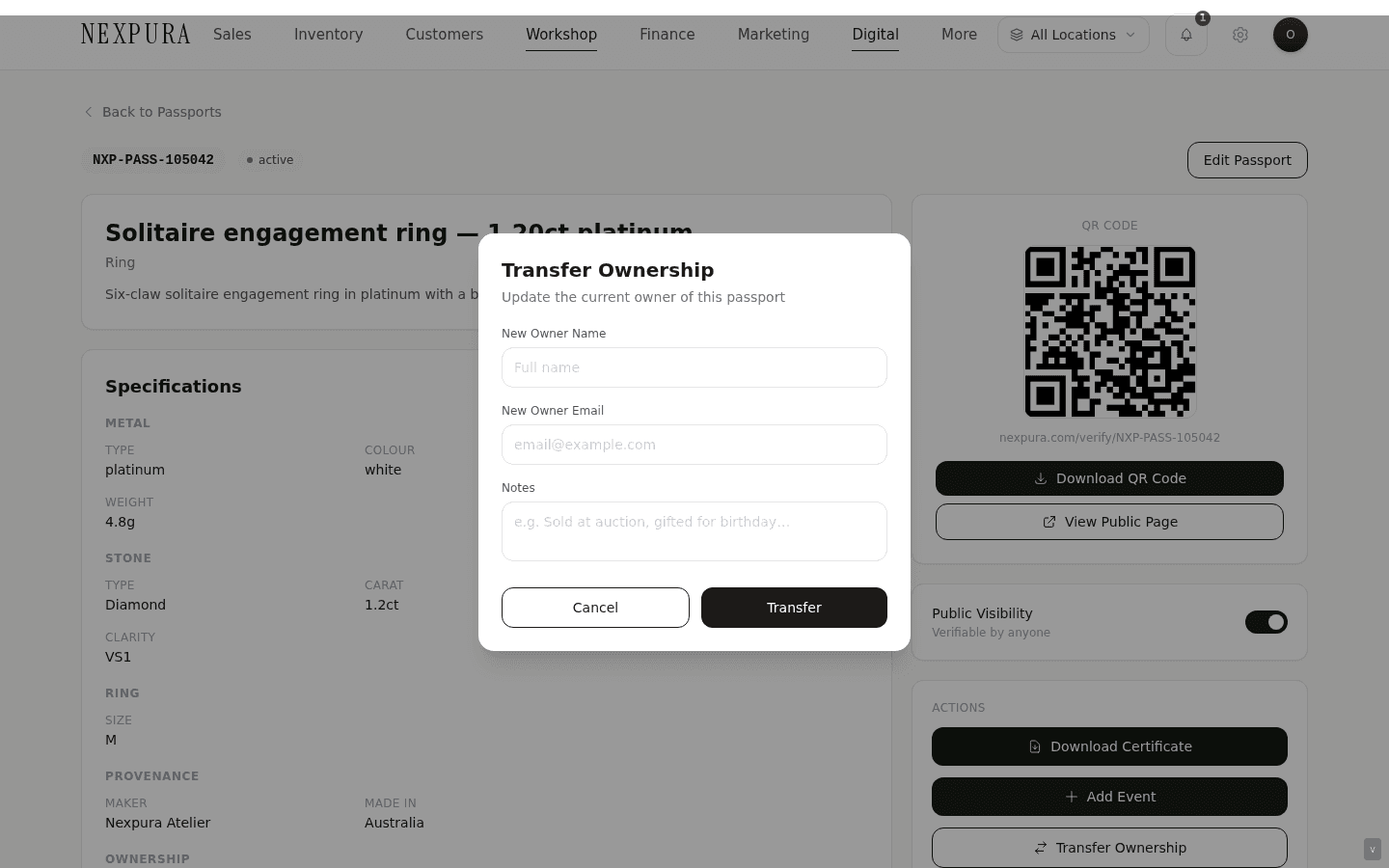
3. Fill in the new owner
Name and email are free text — the new owner doesn't have to exist as a customer record in your tenant. If they're a customer you already have on file, type the name and email exactly as they appear on the customer record so future lookups across the two systems line up; the passport doesn't do an FK lookup automatically. The email field is optional but worth filling if the new owner wants to receive the passport email directly.
4. Write the notes
The Notes field is the place to record the transfer context — “Resold at auction Sept 2026”, “Estate transfer to daughter, no consideration”, “Sold to jeweller-to-jeweller wholesale”. The notes don't surface on the public passport card (which keeps the customer-facing surface clean and impersonal), but they appear under the event-timeline entry on the jeweller-side detail page and they're part of the audit log. Future you, reading the timeline two years from now, will want context — write a sentence.
5. Submit — what changes on save
On submit, two things happen in the same transaction:
- The passport row's current_owner_name and current_owner_email fields overwrite with the new owner. The previous owner's name and email come off the row entirely — they're no longer the answer to “who currently owns this piece”.
- An ownership_transferred event row is appended to the event timeline. The event data captures previous_owner_name, previous_owner_email, new_owner_name, new_owner_email — the snapshot of who held the piece before the change and who holds it now. That snapshot is what makes the timeline a complete chain of custody even though the row-level fields only ever store the current owner.
The passport email is not re-sent automatically on transfer — the new owner doesn't receive anything just because you updated the row. If you want the new owner to have the passport email in their inbox, use the Send Passport Email button on the detail page after the transfer. (Channel: email — passport emails go via the email channel specifically.)
6. Confirm on the customer-facing card
Tap View Public Page beneath the QR Code on the detail page (or open /verify/[uid] in a new tab). The Ownership card now reads the new owner name; the History timeline now has an “Ownership Transferred” entry stamped with today's date. The previous owner's name doesn't appear anywhere on the public surface — chain of custody is visible (the transfer happened) without exposing previous- owner personal detail. Full walkthrough of the customer surface lives on Verify Passport — what your customer sees.
Common questions
Why are ownership transfers append-only? Couldn't the system just delete the old entry?
The passport's reason to exist is provenance — a verifiable, end-to-end record of who has held the piece. If transfers could be deleted or rewritten, the timeline becomes editorial rather than historical, and the value of a passport as evidence on resale evaporates. A future buyer looking at a piece on /verify wants to see the full custody chain, even the stretches that included previous owners they don't know about; a jewellery auditor wants to see that the record hasn't been rewritten between issuance and today. The append-only timeline is what makes those two readings honest.
The technical shape mirrors the editorial intent: the passport_events table records each transfer as a separate row with the previous-owner and new- owner snapshot inside the event data. The passport row itself only stores the current owner — the timeline carries the history. There's no edit path on a logged event, and the save action throws hard if the event-row insert fails (rather than silently letting the passport row update with no audit trail) — that's the rule that protects the chain from a transfer that updates the current owner without leaving a trace.
I made a transfer to the wrong owner — how do I undo it?
You don't undo it; you record a correcting transfer. Open the passport, tap Transfer Ownership again, enter the correct owner's name and email, and use the Notes field to explain — “Correcting accidental transfer of [date] — actual owner is X, prior entry was a data- entry error”. The timeline now reads: first ownership transfer (to the wrong owner, with the original notes), then second ownership transfer (back to the correct owner, with the correction notes). Anyone reading the chain of custody sees the correction in context — what looked like an intermediate hop is explained — which is the right outcome. The point of append-only isn't to punish typos; it's to make sure even the typo and its correction stay on the record.
The new owner isn't a customer of mine — can I still transfer the passport to them?
Yes. The transfer form takes free-text name and email — there's no FK lookup against your customer records, so the new owner can be a private buyer who'll never set foot in your store, a different jeweller buying for resale, an estate, or anyone else you don't hold a record for. That flexibility is what makes the passport useful for second-hand sale and inter-jeweller resale. If they later become a customer, you can record them in /customers separately and the passport's free-text fields are unchanged.
A piece came back through me a few years later — the original owner wants to give it back. Do I transfer ownership in reverse, or do I do something else?
You record a fresh transfer to the original owner. The transfer form doesn't care which direction the chain is moving — it's “set the current owner to X” and the event row captures the change. The timeline shows the round-trip honestly: ownership went to a second party, then transferred back. That reads as it actually happened. Use the Notes field to write a sentence on the context — “Returned by original owner — gift going to family member” or “Bought back from second owner” — so future you knows why the chain looks like that.
Does the previous owner get notified that the passport moved?
No — the transfer action doesn't send anything to the previous owner. The previous-owner email is captured in the event data for audit purposes (so the chain of custody is complete) but the system doesn't use it as a notification target on transfer. If you want the previous owner to know, that's a phone call or an email you send manually. The same applies to the new owner — they don't get an automatic email on transfer; use Send Passport Email from the detail page if you want them to receive the passport link.
What if I don't know the new owner's email?
Leave the email blank. The transfer still records correctly — name + notes are enough — and the passport's current-owner email simply ends up empty. The new owner can still reach their passport via QR sticker, printed certificate, or by typing the identity number into /verify manually. You can fill in the email later from the Edit Passport page if it comes through.
Troubleshooting
Transfer modal submits but the Ownership card on the public passport still shows the old owner
Symptom:the transfer modal closes cleanly, the timeline on the jeweller-side detail page has a new “Ownership Transferred” entry, but the public /verify/[uid] card still reads the previous owner. Cause: almost always a stale cached render of the public page — browsers and intermediaries cache the verify card briefly. Fix:hard- refresh the public page (Cmd+Shift+R). If the new owner still doesn't appear after a hard refresh, open the jeweller-side detail page and confirm the Specifications card's Ownership block reflects the new owner — if it does there, the row updated correctly and the public surface will follow on the next cache cycle.
Transfer save returns “Failed to transfer ownership”
Symptom: the modal sticks open and the action errors. Cause:the row-level update failed — most commonly a transient database issue, less commonly a tenant-scoping check rejecting the request (e.g. you're looking at a passport that belongs to a different tenant context you happened to land on). Fix: retry the submit once. If it errors again, refresh the detail page, confirm the URL is /passports/[id] for the correct tenant, and try the transfer again. Persistent failures on a passport that's clearly yours warrant a support ticket — the transfer action is also where the chain- of-custody event-log throws on failure, so a persistent error means something underlying is off.
The event timeline shows a transfer with no notes, and I can't remember the context
Symptom: you're reading an old transfer entry on the timeline and the Notes line is empty — no context for why the piece moved. Cause:the Notes field is optional on transfer, so a quick submit without filling it leaves the entry bare. The event-data snapshot of previous-owner / new-owner is still there, but the “why” is gone if nobody wrote it down. Fix: the event itself is append-only and not editable. If the context matters now, add a fresh event (use the Add Event action on the detail page — category “authenticated” or “updated” — and write the missing context in its Notes). The two-entry pair reads honestly: transfer happened, context recorded later. Going forward, fill in transfer notes at the time — future-you will thank present-you.
I transferred a passport for a piece a different jeweller originally issued — but the passport isn't on my system
Symptom:a customer brings in a piece with a passport issued by another jeweller, and you can't find the passport in your /passports list. Cause: passports are tenant-scoped — the originating jeweller owns the record, and other tenants can't see or edit it. Cross-tenant passport transfer isn't a supported workflow today (the public /verify surface is the cross-tenant view; the jeweller-side actions are tenant-private by design, because owning the chain of custody for a passport means controlling who can amend it). Fix:the best option is to contact the originating jeweller — their name appears on the public passport card as “Issued by” — and ask them to log the transfer on their side. If they've gone out of business or can't be reached, the alternative is to issue a fresh passport on your tenant with a note in the description acknowledging the original passport. The customer ends up with two passports — imperfect, but honest about the cross-tenant boundary.